Permalink Settings is a configuration page in the WordPress admin dashboard — found at Settings → Permalinks — that controls the URL structure used for all posts, pages, and archive pages on your site. It determines whether your URLs look like yoursite.com/?p=123 or yoursite.com/blog-post-title/, and gives you options to customize the format using preset structures or a fully custom pattern.
This is one of the most impactful settings on a WordPress site because it shapes every URL the site generates. The configuration you choose affects SEO, user experience, and how links to your content appear in search results, social shares, and emails. Most WordPress developers configure Permalink Settings as one of the first steps after installing WordPress — long before content is added — because changing the structure later requires carefully managed 301 redirects to avoid broken links.
[Image: Screenshot of WordPress Permalink Settings page showing the radio button options for Common Settings and Optional sections for Category and Tag bases]
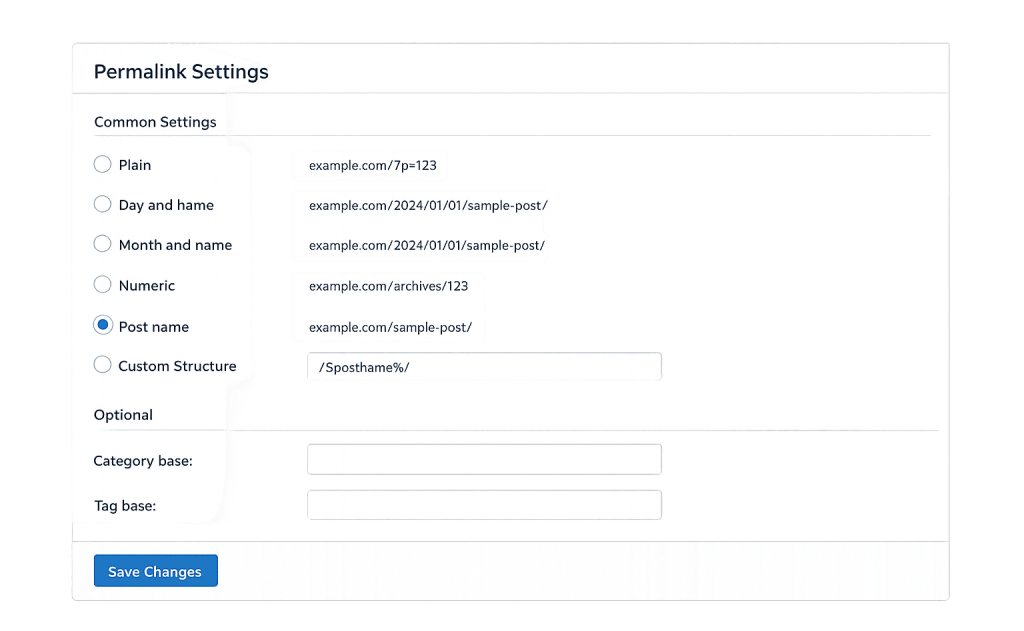
What’s on the Permalink Settings Page
The Permalink Settings page has two main sections:
Common Settings — Six preset structures displayed as radio buttons:
– Plain — ?p=123 (default, worst for SEO)
– Day and name — /2025/03/27/post-name/
– Month and name — /2025/03/post-name/
– Numeric — /archives/123
– Post name — /post-name/ (most widely recommended)
– Custom structure — Build your own using available tags like %year%, %monthnum%, %postname%, %category%, %author%
Optional — Two additional fields for:
– Category base — Customizes the prefix before category archive URLs (default: /category/)
– Tag base — Customizes the prefix before tag archive URLs (default: /tag/)
After saving, WordPress flushes its rewrite rules — the internal rules it uses to map URLs to content — and begins generating URLs using the new structure.
Purpose & Benefits
1. One Setting That Shapes Every URL on Your Site
Permalink Settings is a single configuration point that affects every post, page, category archive, tag archive, and custom post type URL on your site. Getting this right from the start ensures every permalink your site generates is clean and search-engine-friendly. This cascades into all other SEO and content work — from meta descriptions to sitemaps.
2. Direct Impact on SEO and Search Visibility
Search engines read URLs as content signals. The Post Name structure (/%postname%/) places the most relevant keyword-containing segment — the slug — directly after the domain, making it immediately readable. Numeric or query-string URLs convey nothing about the content. Our WordPress development work always starts with Post Name or a deliberate custom structure configured before any content goes live.
3. Control Over Category and Tag URL Bases
The Optional section lets you customize or remove the /category/ prefix from category archive URLs. For example, a site organized around service areas might prefer /services/plumbing/ instead of /category/services/plumbing/. Removing or changing the category base can make URLs cleaner, though it requires testing to ensure no conflicts arise with page slugs.
Examples
1. New Site Setup — Choosing Post Name
A developer sets up a new business website and navigates to Settings → Permalinks before adding any content. They select “Post name” and save. Every page and post slug becomes the final URL segment: a page called “About Us” gets /about-us/, and a blog post titled “WordPress Speed Tips” gets /wordpress-speed-tips/. Clean, descriptive, SEO-friendly.
2. Customizing the Category Base
A photography portfolio site has categories for “Weddings,” “Portraits,” and “Commercial.” By default, the category archive for Weddings would live at /category/weddings/. In Permalink Settings, the owner changes the Category Base to portfolio, making the archive URL /portfolio/weddings/ — which better represents the site’s content hierarchy.
3. Migrating from Default to Post Name on an Existing Site
A two-year-old site has been running on the Plain permalink structure (?p=123). The owner installs an SEO plugin, which flags the structure as harmful to SEO. After careful planning on a staging site, they switch to Post Name and configure 301 redirects from all numeric URLs to their new slug-based equivalents. Search rankings dip briefly while Google processes the redirects, then recover with improved visibility.
Common Mistakes to Avoid
- Using the Plain or Numeric structure — These are essentially the worst-performing options for both SEO and usability. WordPress defaults to Plain on installation, but this should be one of the first things changed on any new site.
- Changing permalink structure on a live site without a redirect plan — Every URL on the site changes when you switch structures. Without 301 redirects mapping old URLs to new ones, existing backlinks break and search rankings drop. Always test this on a staging site first.
- Removing the category base without checking for slug conflicts — If you remove
/category/from category archive URLs, a category slug that matches an existing page slug will cause a conflict. WordPress may not resolve it correctly without additional htaccess configuration. - Setting a custom structure but not fully understanding the tags — Custom structures using
%author%or%postname%at the beginning of the URL can create performance issues on large sites, as WordPress needs more database queries to distinguish post URLs from page URLs.
Best Practices
1. Set Permalink Structure Before Any Content Goes Live
The easiest time to configure Permalink Settings is during initial site setup, before any content is published and indexed. Once search engines have indexed your URLs, changing the structure requires a redirect migration. Start with Post Name unless there’s a specific reason for another structure, and never launch a site on the default Plain structure.
2. Use Post Name for Most Sites
The /%postname%/ structure is clean, keyword-friendly, and widely supported by SEO plugins and caching tools. It puts the descriptive slug front and center in the URL without adding date noise or unnecessary depth. For most business sites, blogs, and service sites, Post Name is the right choice.
3. Flush Rewrite Rules After Major Changes
Any time you change Permalink Settings — including after activating a new plugin or theme that registers custom post types — save the settings page even if you don’t change the structure. This flushes WordPress’s rewrite rules and ensures all URLs resolve correctly. Unexplained 404 errors after plugin changes are often solved by this simple step. You can also do this via WP-CLI with wp rewrite flush.
Frequently Asked Questions
What’s the best permalink structure for SEO?
The Post Name structure (/%postname%/) is recommended by Yoast, AIOSEO, and most SEO professionals. It’s clean, descriptive, and puts your keyword-containing slug directly after the domain. If your site has a clear content hierarchy that benefits from category-prefixed URLs, /%category%/%postname%/ is a reasonable alternative.
Can I change permalink settings on a site that’s already live?
Yes, but it requires careful planning. Every existing URL changes, so you need 301 redirects mapping old URLs to new ones. Most major SEO plugins can assist with this, or it can be handled with .htaccess rules or a redirect plugin. Test everything on a staging site before making changes to the live site.
Why are my pages returning 404 errors after changing permalink settings?
This usually means WordPress’s rewrite rules need to be flushed. Go to Settings → Permalinks and click Save Changes — even if you didn’t change the structure. This regenerates the rewrite rules that map your URL structure to the correct content in the database.
What does the Custom Structure option let me do?
The Custom Structure field accepts any combination of WordPress URL tags: %year%, %monthnum%, %day%, %hour%, %minute%, %second%, %post_id%, %postname%, %category%, and %author%. This lets you build URL structures like /%category%/%postname%/ or /%year%/%postname%/ beyond what the preset options offer.
Should I remove the /category/ base from my category URLs?
Removing the category base (to get /flowers/ instead of /category/flowers/) can make URLs cleaner, but it introduces the risk of slug conflicts with pages. If a page exists with the slug flowers, WordPress won’t know whether to serve the page or the category archive. Only remove the category base if you’re certain there are no conflicts, and test thoroughly.
Related Glossary Terms
How CyberOptik Can Help
Permalink Settings is one of those WordPress configurations that seems simple but has significant downstream consequences when done wrong — or changed carelessly. Our team handles permalink structure planning, redirect migrations, and SEO-safe URL restructuring for clients. Whether you’re setting up a new site or fixing a permalink problem on an existing one, we can help. Get in touch to discuss your project or explore our WordPress development services.