
IP address (Internet Protocol address) is a unique numerical label assigned to every device connected to a network that uses the Internet Protocol for communication. An IP address serves two primary functions: identifying a device (or server) on a network, and providing the location information needed to route data packets to the correct destination. In practical terms, every website is hosted on a server that has an IP address, and every device — desktop, phone, tablet — that visits that website also has one.
IP addresses are the underlying addressing system of the internet. When you type a domain name into a browser, the DNS system translates that human-readable address into the IP address of the server where the site is hosted. The data travels across the network to that IP address, and the server sends back the web page. Without IP addresses, the internet as we know it couldn’t function — they’re the postal addresses of the digital world.
[Image: Diagram showing user browser → DNS lookup → IP address → server → website response]
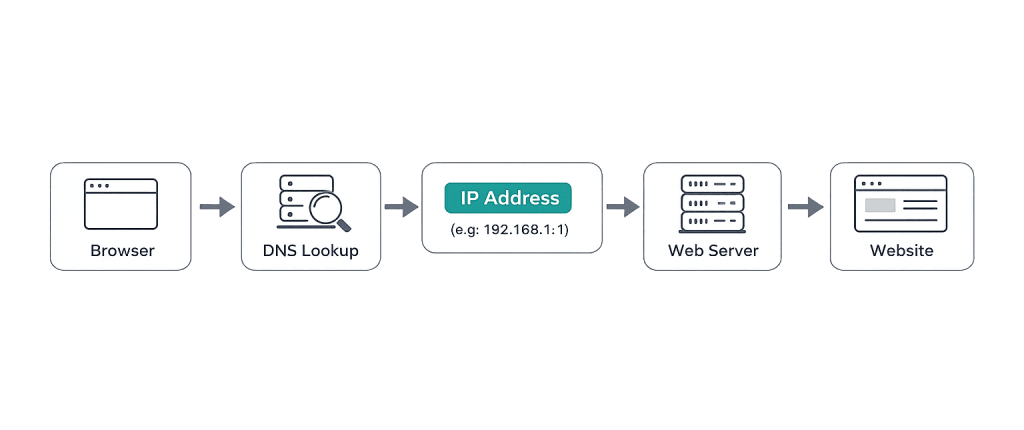
How IP Addresses Work
IP addresses come in two main versions:
- IPv4 — The original format, written as four groups of numbers separated by dots (e.g.,
192.168.1.1). IPv4 supports approximately 4.3 billion unique addresses — a number that proved insufficient as internet-connected devices multiplied. - IPv6 — The newer format, written as eight groups of hexadecimal numbers separated by colons (e.g.,
2001:0db8:85a3:0000:0000:8a2e:0370:7334). IPv6 supports a virtually unlimited number of addresses and was developed to address IPv4 exhaustion.
They also fall into two assignment types:
- Static IP address — A fixed address that doesn’t change over time, manually assigned. Web servers and hosting environments typically use static IPs because the address needs to remain consistent for DNS records and other services to function reliably.
- Dynamic IP address — An address assigned automatically by a DHCP server, which may change when a device reconnects. Most home internet connections and mobile devices use dynamic IP addresses.
Purpose & Benefits
1. Server Identification and Domain Resolution
Every website sits on a server with an IP address. When your domain is configured, its A record maps the domain name to the server’s IP address. This is the mechanism that makes yoursite.com resolve to the correct server. If you change hosting providers, the IP address changes, which is why you update your DNS records — specifically the A record — to point to the new server. The DNS domain name system bridges the gap between human-readable domains and numeric IP addresses.
2. Security and Access Control
IP addresses enable targeted security controls. Firewalls use IP-based rules to allow or block traffic. Web servers — including through .htaccess on Apache — can restrict admin areas to specific trusted IP addresses, block known malicious IPs, or limit access to development environments. For WordPress sites, restricting wp-admin to known IP addresses is a practical hardening measure. IP address logging also helps identify the source of attacks, brute force attempts, and suspicious behavior.
3. Hosting Configuration and Email Deliverability
A dedicated IP address (as opposed to a shared IP) can affect both site performance and email deliverability. On shared hosting, multiple sites share the same IP. If one of those sites is flagged for spam or blacklisted, it can affect the reputation of all sites on that IP. Dedicated IP addresses give sites their own reputation, which matters for businesses sending marketing email and for sites that need SSL certificates issued at the IP level. Our hosting services help clients navigate these configuration decisions.
Examples
1. Pointing a Domain to a New Host
A business moves their WordPress site from one hosting provider to another. After the migration is complete, they update their domain’s A record in their DNS settings to reflect the new server’s IP address. DNS propagation takes 24–48 hours during which some users may still reach the old server. Once propagation is complete, all traffic routes to the new IP address and the migration is live for all visitors.
2. IP-Based Admin Restriction in WordPress
A development team restricts access to the WordPress admin panel (/wp-admin/) to the IP addresses of their office and remote developers. Any login attempt from an unrecognized IP is blocked at the server level before WordPress even loads. This significantly reduces the attack surface for brute force login attempts — a common threat for WordPress sites. The restriction is configured via .htaccess on Apache servers.
3. Investigating a Blacklisted IP
A business notices their marketing emails are landing in spam folders. Investigation reveals the server’s IP address has been blacklisted by several spam monitoring services — a consequence of sharing an IP with another site on the same shared hosting plan that was used for spam. The solution is to move to a dedicated IP address or a managed hosting environment with better IP reputation controls, then request delisting from the blacklist databases.
Common Mistakes to Avoid
- Confusing IP address with domain name — A domain name is the human-readable address (e.g.,
example.com). The IP address is the numeric address of the server. They’re connected by DNS, but they’re separate concepts. Updating one doesn’t automatically update the other. - Using a shared IP for outbound email — Shared IP addresses on shared hosting environments carry the reputation of every site on that server. For businesses sending volume email, a dedicated IP — or a dedicated email service provider — is worth the investment.
- Forgetting to update DNS after a host change — Moving to a new host changes your server’s IP address. If you don’t update your A record in DNS, traffic continues going to the old (now inactive) server. Always verify DNS propagation after a hosting migration.
- Relying solely on IP blocking for security — IP-based blocking is a useful layer, but not a complete security strategy. Attackers rotate IP addresses, and legitimate users on dynamic IPs may get blocked unintentionally. Pair IP restrictions with other firewall and authentication controls.
Best Practices
1. Know Your Server’s IP Before Making DNS Changes
Before making any DNS changes — migrating hosts, adding new DNS records, or modifying A records — confirm the current IP address of your server and the new target IP. DNS propagation errors caused by copying incorrect IP addresses can take 24–48 hours to surface and diagnose. Keep a record of all IP addresses associated with your hosting environment.
2. Use a Dedicated IP for Business-Critical Applications
If your business relies on outbound email marketing, handles sensitive customer data, or runs an application where consistent server addressing is important, a dedicated IP address eliminates the risk of being affected by other tenants on a shared server. Many managed WordPress hosting environments provide dedicated IP addresses as part of their standard configuration.
3. Monitor IP Reputation Regularly
Use tools like MXToolbox or Google Postmaster Tools to monitor whether your server’s IP address appears on any spam blacklists. If it does, investigate the cause (usually spam originating from the server or a misconfigured mail service), remediate the issue, and request delisting. Catching and resolving blacklist issues early prevents email deliverability problems from escalating.
Frequently Asked Questions
What’s the difference between an IP address and a domain name?
A domain name (like example.com) is the human-readable address you type into a browser. An IP address (like 203.0.113.42) is the numeric address of the actual server. The DNS system translates the domain name into the IP address automatically when you make a request. You interact with domain names; computers interact with IP addresses.
Does my website’s IP address affect SEO?
Directly, no — Google doesn’t rank sites higher or lower based solely on their IP address. Indirectly, it can matter: a blacklisted IP affects email deliverability, which can affect marketing campaigns, and an IP associated with spammy sites on the same server could (in rare cases) influence crawl behavior. Hosting on a reputable provider with clean IP ranges is a basic technical hygiene measure.
What happens when my site’s IP address changes?
When a server’s IP address changes (typically after a hosting migration), the A record in your DNS settings must be updated to point to the new IP. During the DNS propagation period (typically 24–48 hours), some visitors may be routed to the old server, which is why migrations are best planned with proper overlap or taken offline during the switch.
What is a dedicated IP address for WordPress?
A dedicated IP address means your WordPress site is the only site on that server IP — rather than sharing an IP with hundreds of other sites on shared hosting. Benefits include better email reputation, the ability to access your site via IP directly for troubleshooting, and isolation from other tenants’ behavior. Many managed WordPress hosting plans include a dedicated IP.
Can I see who’s visiting my site using IP addresses?
Your server logs record the IP addresses of visitors. These can be used to identify patterns, block malicious traffic, and — in broad terms — identify the geographic region of visitors (since IP address ranges are associated with geographic areas). However, you cannot identify an individual person by their IP address without additional legal processes, and privacy regulations govern how IP data is collected and stored.
Related Glossary Terms
How CyberOptik Can Help
Understanding IP addresses and how they interact with your hosting, DNS, and email infrastructure is part of managing a professional web presence. Our team handles hosting configuration, migrations, and server-level security for clients every day — including IP configuration, DNS management, and dedicated hosting environments. Learn about our hosting solutions or contact us to discuss your infrastructure needs.


