
Interaction to Next Paint (INP) is a Core Web Vitals metric that measures how quickly a webpage responds to user interactions — clicks, taps, and keyboard inputs — across the entire page session. It replaced First Input Delay (FID) as an official Core Web Vital in March 2024. INP gives a more complete picture of a page’s responsiveness than FID did, because it evaluates all interactions during a visit rather than just the first one.
Understanding INP matters because Google uses Core Web Vitals as ranking signals. A page that responds sluggishly to user interactions — buttons that don’t react immediately, menus that lag before opening, forms that freeze after typing — creates a poor user experience and can hurt both your search rankings and your conversion rate. INP is measured in milliseconds and scored at the 75th percentile of all user interactions across page loads.
FID vs. INP: Why the Metric Changed
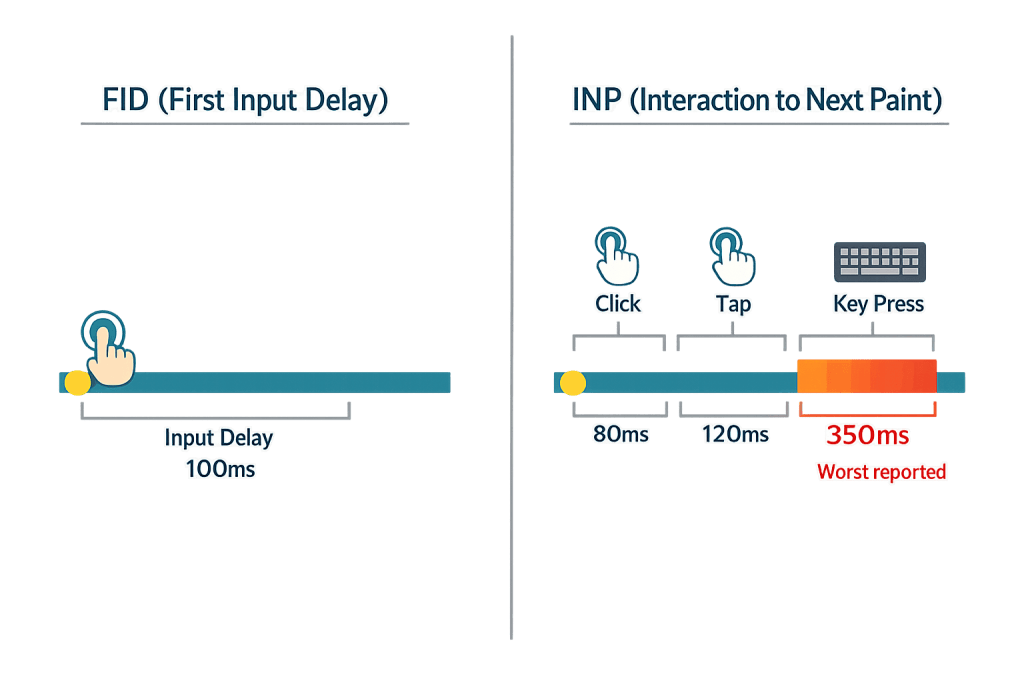
First Input Delay (FID) measured only the delay before the browser could begin processing the very first interaction a user made with a page. It was a good early indicator of responsiveness but had real limitations:
- It only captured the first interaction, missing problems that appeared later in a session
- It measured input delay only — not the full time until the browser visually updated in response
- A page could score perfectly on FID while still feeling sluggish during actual use
Interaction to Next Paint (INP) addresses all three limitations. It:
- Evaluates all interactions during the page session
- Measures from the start of the interaction to the next paint — the moment the browser renders a visible response
- Reports the single worst interaction (with some outlier protection), giving a realistic picture of how the page performs under real use
Google officially deprecated FID on March 12, 2024. FID data disappeared from Google Search Console at that point, and INP became the responsiveness metric that affects your Core Web Vitals assessment.
[Image: Side-by-side comparison showing FID measuring only the first interaction vs. INP measuring all interactions and reporting the worst]
INP Scoring Thresholds
Google defines INP performance in three bands:
| Score | Assessment |
|---|---|
| 200ms or less | Good |
| 201–500ms | Needs Improvement |
| 500ms or more | Poor |
These thresholds are evaluated at the 75th percentile — meaning 75% of all interactions on your page should fall within the “Good” range for your site to pass the Core Web Vitals assessment.
Purpose & Benefits
1. A More Accurate Measure of Real User Experience
INP captures what FID missed — the full picture of how a page feels to use over an entire session. A page that loads quickly (Largest Contentful Paint) but feels sluggish when users interact with it creates a disconnect between first impression and actual use. INP surfaces this problem and gives you an actionable target to fix. Improving INP often directly improves user satisfaction and reduces bounce rates, which feeds back into better PageSpeed performance signals overall.
2. A Ranking Signal That Reflects User Behavior
Google uses Core Web Vitals — including INP — as ranking signals for search results. A site that fails the INP assessment may underperform in organic search compared to competitors with equivalent content but faster interactions. This matters most for pages where users interact heavily: product pages, contact forms, calculators, filters, and any page with dynamic content. Improving INP is both an SEO investment and a user experience improvement.
3. Forces Attention on JavaScript Performance
Poor INP is almost always caused by JavaScript blocking the browser’s main thread — preventing it from responding to user input. Fixing INP requires addressing the underlying JavaScript architecture, which typically also improves overall site performance. Common culprits include heavy third-party scripts (chat widgets, analytics, ad tags), inefficient event handlers, and large JavaScript bundles. Addressing these has downstream benefits for Cumulative Layout Shift (CLS) and overall site responsiveness.
Examples
1. A Contact Form With a Slow Submit Button
A user fills out a contact form and clicks “Send.” Instead of seeing immediate feedback, they wait 800ms before anything happens — no spinner, no state change, nothing. The browser’s main thread was blocked by a third-party chat widget loading in the background. This single interaction would score as “Poor” on INP. The fix: defer the chat widget’s initialization until after the page is interactive, freeing the main thread to respond to user input immediately.
2. A Product Filter on an eCommerce Page
A WooCommerce store has a sidebar filter — users click checkboxes to narrow products by category. Each click triggers a JavaScript calculation that takes 400ms to complete before the page updates. This lands in “Needs Improvement” territory. Optimizing the event handler to process the filter logic more efficiently, or breaking the work into smaller asynchronous chunks using requestIdleCallback, can bring the response time below 200ms into “Good” range.
3. A Navigation Menu With a Lag on Mobile
A hamburger menu on a mobile device takes 600ms to open after the tap. This is common when a menu’s open/close state is managed by a heavy JavaScript framework that isn’t optimized for mobile. Simplifying the menu interaction — using CSS transitions triggered by a lightweight event handler rather than a full framework re-render — can cut the interaction time dramatically and move the INP score into the “Good” range.
Common Mistakes to Avoid
- Ignoring INP because FID was passing — Many sites that scored well on FID have poor INP because the metrics measure different things. Don’t assume your old Core Web Vitals pass translates to a passing INP score — check Google Search Console or PageSpeed Insights for current INP data.
- Loading all JavaScript on page load — Loading every script at once blocks the main thread and is the most common cause of poor INP. Defer non-critical scripts, lazy-load third-party widgets, and prioritize only what the user needs immediately.
- Attributing slow INP only to your theme or plugin — Third-party scripts (live chat, marketing pixels, A/B testing tools) are frequent INP culprits. Audit all scripts loaded on your pages, not just your own code.
- Testing only in desktop Chrome — INP problems are often more severe on lower-powered mobile devices. Always check field data (real user measurements) from Google Search Console, not just lab data from developer tools.
Best Practices
1. Measure with Real User Data from Search Console
Google Search Console’s Core Web Vitals report shows INP data based on actual Chrome user field data — not simulated lab tests. This is the most reliable source for understanding your real INP performance. Check it monthly, pay attention to which URL groups are failing, and prioritize fixes for the pages that matter most to your business. PageSpeed Insights also shows INP alongside the other Core Web Vitals.
2. Defer and Lazy-Load Non-Critical JavaScript
The fastest way to improve INP is to give the browser’s main thread room to respond to user input. Audit your scripts and defer anything that isn’t needed for the initial page interaction — analytics scripts, marketing pixels, chat widgets, and video embeds can all be loaded after the page becomes interactive. This single change often produces the largest INP improvement for content-heavy WordPress sites.
3. Break Up Long-Running JavaScript Tasks
If a JavaScript operation takes more than 50ms, it blocks the browser’s ability to respond to input during that time. Long tasks — common in heavy frameworks, complex filter logic, and data-intensive widgets — are the direct cause of high INP scores. Splitting these tasks into smaller chunks using techniques like setTimeout or requestIdleCallback keeps the main thread available for user interactions between chunks.
Frequently Asked Questions
Is FID still relevant?
No. FID was officially deprecated on March 12, 2024, and removed from Google Search Console at the same time. INP is now the Core Web Vitals metric for measuring interactivity and responsiveness. If you see references to FID in older articles or tools, treat them as outdated for ranking purposes.
How do I check my site’s INP score?
Two main options: Google Search Console (under Core Web Vitals → field data for real user measurements) and PageSpeed Insights (which shows both lab and field data). For developer-level diagnosis, Chrome DevTools’ Performance panel and the Web Vitals Chrome extension can help identify which interactions are causing slow INP.
Does WordPress specifically have INP problems?
Some WordPress sites do, particularly those with heavy page builders, many third-party plugins, or unoptimized JavaScript. The root cause is almost always JavaScript loading and execution patterns rather than WordPress itself. Well-built WordPress sites — with clean code and disciplined asset loading — can achieve excellent INP scores.
How does INP relate to other Core Web Vitals?
The three Core Web Vitals cover different dimensions of performance: Largest Contentful Paint (LCP) measures load speed, INP measures interactivity, and Cumulative Layout Shift (CLS) measures visual stability. All three need to be in the “Good” range to pass the Core Web Vitals assessment. Improving INP often also improves LCP, since both are affected by JavaScript performance.
What’s a realistic INP improvement target?
Aim for under 200ms consistently. For most WordPress sites with reasonable JavaScript loading, this is achievable. Sites using heavy page builders or large third-party script stacks may need more significant optimization work — but even reducing from 600ms to 300ms represents a meaningful improvement in user experience, even if the “Good” threshold hasn’t yet been crossed.
Related Glossary Terms
How CyberOptik Can Help
Core Web Vitals performance — including INP — is part of what we evaluate and optimize for clients. Whether you need a technical audit to identify what’s causing slow interaction times, or a full site rebuild designed for performance from the ground up, our team understands how design, development, and hosting decisions affect these metrics. Contact us for a free website review or learn more about our SEO services and web design work.


