A title tag is an HTML element that defines the title of a web page — the text that appears as a clickable headline in search engine results and in the browser tab when a visitor has that page open. It is one of the most fundamental on-page SEO elements, giving both search engines and users their first indication of what a page is about.
Every page on your website should have a unique, descriptive title tag. In practice, a well-written title tag does two jobs at once: it tells Google what to rank the page for, and it convinces the person scanning search results to click your link over someone else’s. That second job — driving the click — is where most businesses leave opportunity on the table.
[Image: Screenshot showing a title tag as it appears in a Google SERP result vs. the underlying HTML code]
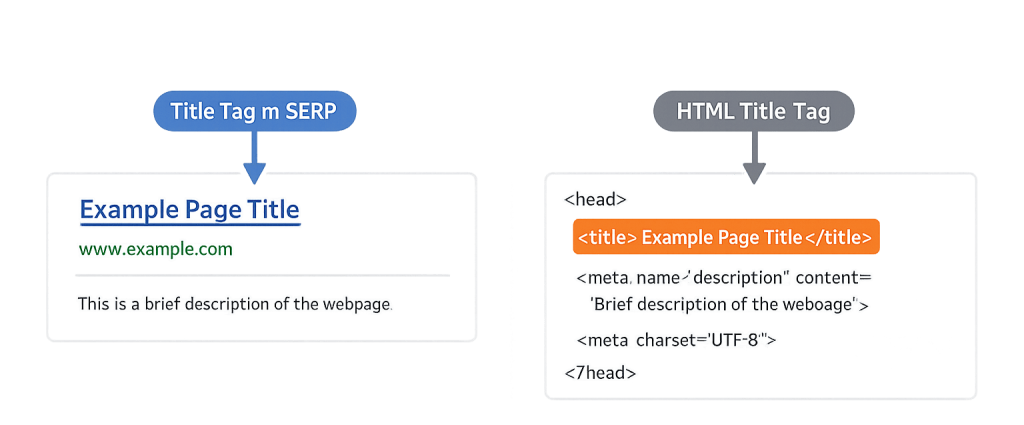
How Title Tags Work
When a search engine crawls your page, it reads the <title> element in the HTML <head> section. That text is indexed and typically displayed as the blue clickable link in the search engine results page.
A few important mechanics worth understanding:
- Character display limit: Google typically displays around 50–60 characters of a title tag before truncating with an ellipsis. Research suggests the average displayed title runs 42–46 characters, and shorter titles that are precise tend to be favored. If you need more characters to accurately describe the page, use them — just know Google may truncate or rewrite.
- Google rewrites: Google can and does rewrite title tags it considers low-quality, too long, too short, or stuffed with keywords. When it does, it often substitutes your H1 heading or another prominent text element.
- Browser tabs: The title tag text also appears in the browser tab, helping users navigate multiple open tabs.
- Keyword signal: Placing your primary keyword near the beginning of the title tag carries more weight than placing it at the end.
Purpose & Benefits
1. Direct Impact on Search Rankings
Title tags are one of the few on-page elements Google explicitly uses to understand page relevance. Including your target keyword in the title — ideally near the front — signals what the page covers and improves its chances of matching relevant queries. This is a core element of on-page SEO that every well-optimized page requires.
2. Higher Click-Through Rate from Search Results
A compelling title tag functions like ad copy: it needs to earn the click. Pages with clear, descriptive, benefit-oriented titles consistently outperform pages with vague or generic ones. A higher click-through rate sends a positive engagement signal and can contribute to better rankings over time.
3. Consistent Brand Recognition
Including your brand name in the title tag — typically at the end, separated by a pipe or dash — helps build recognition in the SERPs. Over time, searchers who repeatedly see your brand name beside relevant results develop familiarity and trust, which increases the likelihood they click your result specifically. Our SEO services include optimizing title tags as part of every audit.
Examples
1. Local Service Business
A plumbing company with a page about water heater installation might use: “Water Heater Installation & Replacement | [Brand]”. This targets a specific service keyword, sets clear expectations about the page content, and includes the brand. It’s specific enough to attract intent-driven searchers without sacrificing clarity.
2. eCommerce Product Category
An online retailer could write: “Men’s Running Shoes — Lightweight & Cushioned | [Brand]”. The primary keyword leads, descriptive modifiers add context for the right buyer, and the brand anchors trust. Pages that use product attributes (lightweight, cushioned) in titles can attract more qualified clicks from searchers who know what they want.
3. Blog Post or Informational Page
A web agency might title a blog post: “What Is a Title Tag? SEO Basics Explained”. This directly mirrors how someone would type the query into Google, front-loads the topic, and signals the content format (explanation/guide). Informational page titles that match search intent closely are more likely to appear in featured snippets.
Common Mistakes to Avoid
- Duplicate title tags — Using the same title for multiple pages confuses search engines and dilutes your ranking signals. Every page needs a unique title that reflects its specific content.
- Keyword stuffing — Forcing multiple keyword variations into a title (“Plumber | Plumbing Services | Plumbing Contractor”) looks spammy to both users and search engines, and often triggers Google rewrites.
- Vague or generic titles — “Home” or “About Us” tells search engines almost nothing. Even pages that seem generic deserve a descriptive, keyword-aware title.
- Missing title tags entirely — Pages without a
<title>element get titles auto-generated by Google from whatever text it finds on the page — often with poor results. Every page should have one intentionally written.
Best Practices
1. Lead with the Primary Keyword
Place your most important keyword as close to the beginning of the title as possible. This gives it more weight in Google’s relevance calculations and ensures it’s visible even if the title gets truncated. Pair this with your meta description to form a complete SERP pitch for each page.
2. Write for the Human First
A title tag that ranks but doesn’t get clicked does limited good. Think about what a person scanning search results needs to see in order to choose your page. Clear benefit language, specificity, and a natural reading flow outperform keyword-dense phrasing that reads awkwardly. Your search intent analysis should inform every title you write.
3. Audit Titles Regularly
Title tags can drift out of alignment with content as pages are updated — or Google may start rewriting them if it deems them low quality. Periodically audit your titles using Google Search Console’s Performance report, which shows what text Google is actually displaying for your pages. If rewrites are common, that’s a signal your titles need revision.
Frequently Asked Questions
How long should a title tag be?
Aim for 50–60 characters to avoid truncation in most SERP displays. Shorter titles that are precise — around 42–46 characters — appear to be what Google favors when displaying results. That said, there’s no strict character limit in Google’s algorithm; prioritize clarity and relevance over hitting an exact count.
Does a missing title tag hurt my SEO?
Yes. Without a <title> element, Google generates one from page content — often from a heading or random text it finds — which is rarely optimal. You lose control over how the page is represented in search results, which can hurt both rankings and click-through rates.
Can Google rewrite my title tag?
Google regularly rewrites title tags it considers too long, too short, keyword-stuffed, or misaligned with the page content. Studies show Google rewrites a significant percentage of title tags. The best defense is writing titles that are accurate, readable, and closely aligned with your H1 heading.
Should every page have a unique title tag?
Yes — every page should have a distinct title that reflects its specific content and target keyword. Duplicate titles across multiple pages signal to search engines that the pages may be redundant, and they miss the opportunity to target unique queries.
Is the title tag the same as the H1 heading?
No, though they’re often similar. The title tag is HTML metadata — visible in search results and browser tabs but not on the page itself. The H1 is the main visible heading on the page. They should be aligned in meaning, but they don’t need to be identical, and each serves a different purpose.
Related Glossary Terms
- Meta Description
- On-Page SEO
- Keyword
- Search Engine Results Page (SERP)
- Search Intent
- Click-Through Rate (CTR)
- Technical SEO
- SEO Plugin
How CyberOptik Can Help
Title tag optimization is one of the first things we address in any SEO audit — and one of the highest-impact improvements we make for clients whose sites aren’t performing in search. Getting them right across every page of a site requires a clear keyword strategy, understanding of search intent, and careful attention to how Google is currently displaying and rewriting titles. Contact us for a free website review or explore our SEO services.