
Structured data is a standardized format for providing information about a webpage’s content to search engines in a way they can precisely understand and act on. Rather than asking Google to infer that a page is a recipe, a product listing, or a local business, structured data explicitly communicates those facts using a shared vocabulary — most commonly Schema.org markup — added to the page’s code.
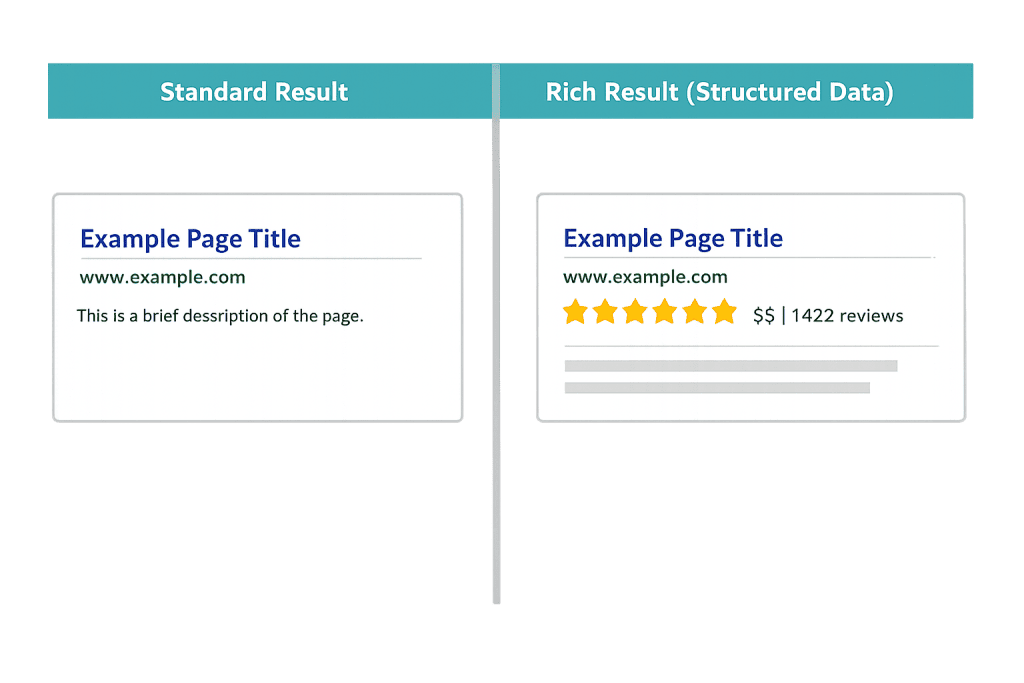
When structured data is implemented correctly, search engines can use that information to generate enhanced search results called rich snippets or rich results. These can include star ratings, pricing information, event dates, FAQs, and other details that appear directly on the search results page — before a user ever clicks. In competitive search results, a rich result stands out visually and often earns a higher click-through rate than a plain blue link.
[Image: Side-by-side SERP comparison showing a standard search result vs. a rich result with star ratings, price range, and review count]
Types of Structured Data
Schema.org provides hundreds of content types, but the most commonly used for business websites include:
- Organization / LocalBusiness — Name, address, phone number, business hours, social profiles, and service area. Helps power the Knowledge Panel in search results.
- Article / BlogPosting — Publication date, author, headline. Helps news and blog content appear in Top Stories and Discover.
- FAQPage — Lists questions and answers. Can generate expandable FAQ results directly in the SERP, dramatically increasing page visibility.
- Product — Price, availability, SKU, reviews. Powers product-specific rich results in Google Shopping and standard search.
- BreadcrumbList — Mirrors the page’s breadcrumb navigation. Helps Google display URL paths in search results, improving click-through.
- Review / AggregateRating — Star ratings displayed directly in search results. Common for products, services, and local businesses.
Structured data is most commonly written in JSON-LD format — a block of JavaScript code embedded in the page’s <head> or <body>. Google officially recommends JSON-LD over older formats like Microdata and RDFa.
Purpose & Benefits
1. Enhanced SERP Visibility Through Rich Results
Pages with properly implemented structured data are eligible for rich results — enhanced SERP listings that include visual elements like stars, images, prices, and FAQs. These features increase the visual footprint of your listing in search results, which typically improves click-through rates. A rich snippet for a product page that shows star ratings and price can perform significantly better than a plain text result for the same query.
2. Better Search Engine Understanding of Content
Search engines are sophisticated, but structured data removes ambiguity. When you mark up a page with LocalBusiness schema, you’re telling Google definitively that this page represents a business — its name, phone number, hours, and location — rather than asking the algorithm to guess. This supports more accurate indexing and can feed information into Google’s Knowledge Graph. This is a key element of technical SEO.
3. Support for Voice Search and AI Overviews
As search evolves toward voice responses and AI-generated answers, structured data becomes even more important. When Google’s AI Overview or a voice assistant reads out a direct answer to a question, that answer is often drawn from clearly structured content. Well-implemented FAQ and How-To schema positions your content to be referenced in these answer formats.
Examples
1. FAQ Schema on a Service Page
A web design agency adds FAQPage structured data to its WordPress services page, marking up five common questions and answers about their process. In search results, those questions expand directly under the main listing — giving the page dramatically more SERP real estate without requiring the user to click. Click-through rates on FAQ-enhanced results often improve meaningfully compared to standard results.
2. Product Schema on a WooCommerce Store
An e-commerce retailer adds Product schema to each product page, including price, availability, SKU, and AggregateRating markup. Google displays star ratings, price, and stock status directly in the search results for those product pages. Shoppers searching for that product can see key details before clicking — reducing bounces from visitors who might have found the product out of their price range.
3. LocalBusiness Schema for a Professional Services Firm
An accounting firm adds LocalBusiness structured data to their homepage, including name, address, phone, business hours, and service area. This data feeds Google’s Knowledge Panel — the box that often appears on the right side of search results for branded searches — and helps the business appear in local search results with accurate contact information.
Common Mistakes to Avoid
- Marking up content not visible on the page — Google requires that structured data describe content the user can actually see on the page. Adding rich snippets for ratings or prices that don’t appear in the visible page content is a policy violation that can result in manual action penalties.
- Using deprecated or incorrect schema types — Schema.org and Google’s implementation evolve over time. Markup that worked several years ago may no longer be supported. Always validate your structured data against Google’s Rich Results Test to confirm it’s current and error-free.
- Ignoring validation errors — Adding structured data without checking for errors means you may not be getting the rich result benefit you expect. Use Google’s Rich Results Test or the Schema Markup Validator to check for errors before and after implementation.
- Relying on plugins without verifying output — Many WordPress SEO plugins generate structured data automatically. This is convenient, but it’s worth verifying the output is correct for your specific content types. Auto-generated schema sometimes misses context or generates incorrect markup.
Best Practices
1. Start with the Schema Types Most Relevant to Your Business
Don’t try to implement every schema type at once. Focus on what’s most impactful for your content: LocalBusiness for any business with a physical location or service area, FAQPage for service or product pages that include Q&A content, and Product for e-commerce pages. Implement these well before adding more types.
2. Use JSON-LD Format
Google officially recommends JSON-LD as the preferred structured data format. It’s added as a script block to the page rather than woven into the HTML, which makes it easier to maintain and debug. Most modern WordPress SEO plugins like Yoast and RankMath generate JSON-LD automatically for common schema types.
3. Validate After Every Change
Any time you update your structured data — or make changes to the page content it references — run the page through Google’s Rich Results Test. This catches errors before they affect your search appearance. Set up Google Search Console alerts for structured data issues so you’re notified if existing markup breaks.
Frequently Asked Questions
Is structured data a direct Google ranking factor?
Not directly — Google has stated that structured data is not a direct ranking signal. However, it influences rankings indirectly by enabling rich results that improve click-through rates, and by helping search engines understand your content more precisely, which supports better indexing and relevance signals.
Do I need a developer to implement structured data?
Not always. Plugins like Yoast SEO, RankMath, and Schema Pro handle common schema types automatically. For more complex implementations — like custom product types, event schemas, or multi-location businesses — developer assistance ensures the markup is accurate and complete. Getting it wrong can result in rich result ineligibility or policy violations.
What is the difference between structured data and schema markup?
The terms are often used interchangeably. “Structured data” is the broader concept of adding machine-readable information to webpages. “Schema markup” refers specifically to using the Schema.org vocabulary to implement structured data. JSON-LD is the formatting method. All three work together — Schema.org provides the vocabulary, JSON-LD provides the format, and structured data is the result.
How long does it take for rich results to appear after adding structured data?
Google needs to crawl and process your pages after you add structured data. For most sites, rich results can appear within a few days to a few weeks — depending on how frequently Google crawls your site. Submitting the page for re-indexing through Google Search Console can speed up the process.
Related Glossary Terms
- Schema Markup
- Rich Snippet
- Technical SEO
- SERP Features
- SEO Plugin
- Sitemap
- Breadcrumb Navigation
- People Also Ask
How CyberOptik Can Help
Structured data is one of the most underutilized SEO opportunities on most business websites — and one of the more technically exacting to implement correctly. Our team handles schema markup as part of comprehensive SEO audits and ongoing optimization work, identifying which schema types make sense for your content and ensuring the implementation passes Google’s validation requirements. Contact us for a free website review or learn more about our SEO services.


