
Conversion is the moment when a website visitor completes a desired action — the specific behavior that moves them from passive observer to engaged prospect or customer. The definition of a conversion is set by the site owner based on the business goal: a phone call, a form submission, an online purchase, an email sign-up, a file download, or even a click on a key link. Every website has actions it wants visitors to take, and a conversion is when a visitor takes one of them.
Conversions are the foundation of website performance measurement. Traffic numbers, bounce rates, and time-on-page are interesting, but they don’t tell you whether a website is actually working as a business tool. Conversion tracking closes the loop between marketing activity and business results — connecting the traffic you drive to the outcomes that matter.
Types of Conversions
Not all conversions are equal. The two primary categories are:
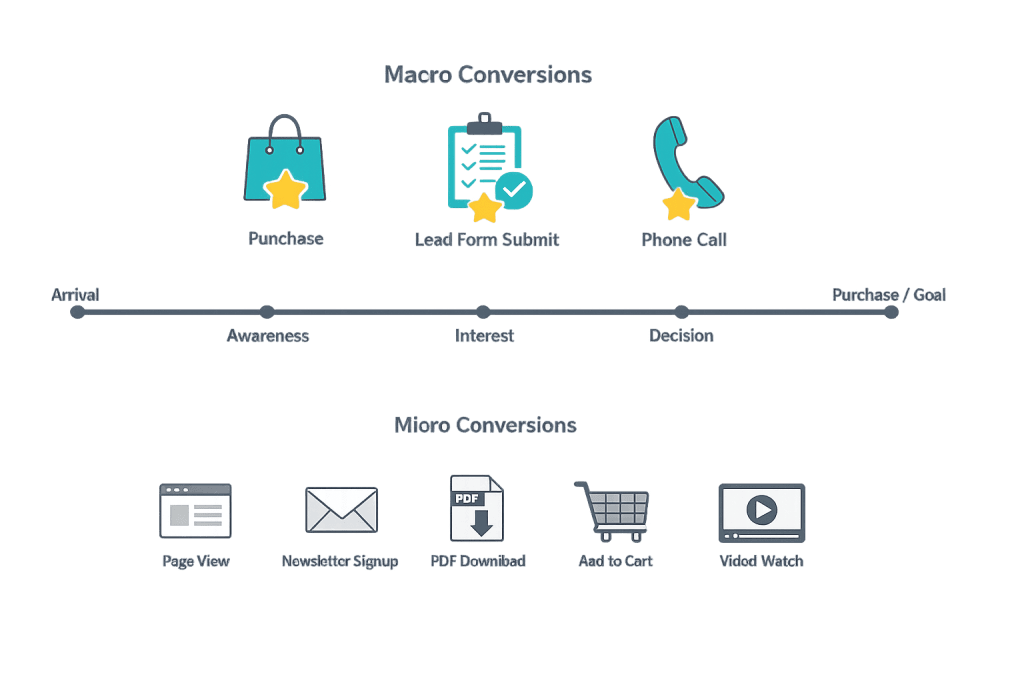
Macro conversions — The primary goal of the site. For most business websites, this is a lead form submission, a phone call, or an online purchase. These are the actions that most directly drive revenue.
Micro conversions — Smaller actions that indicate engagement and often predict macro conversions. Examples include:
– Viewing a pricing page or service page
– Downloading a guide or brochure
– Watching a video past a certain threshold
– Adding an item to a shopping cart
– Signing up for a newsletter
– Spending more than a set amount of time on a page
Tracking micro conversions helps you understand how visitors behave before they reach the primary goal. A visitor who views three service pages, downloads a case study, and then fills out a contact form shows a clear progression of intent — and each of those steps is a trackable conversion event.
The full path visitors take from first awareness to final conversion is called the conversion funnel, and understanding it reveals where in the process visitors are dropping off.
[Image: Diagram showing macro and micro conversion events mapped along a visitor journey]
Purpose & Benefits
1. Ties Marketing Activity to Business Outcomes
Without conversion tracking, you can measure how many people visited your site, but not what they did when they got there. With conversions defined and tracked, you can see which traffic sources, campaigns, and pages are generating real business results. This is what makes data-driven marketing decisions possible — and it’s central to how we approach digital marketing analytics for clients.
2. Reveals What’s Working and What Isn’t
Conversion data is the most direct signal that a website is performing. A page with high traffic but low conversions has a problem — either the wrong audience is landing on it, or the page isn’t doing its job. Identifying low-converting pages is the starting point for conversion rate optimization (CRO), which systematically improves those pages’ ability to produce results.
3. Enables Better Budget Allocation
When you know which channels and campaigns are generating conversions — not just traffic — you can allocate marketing budget more effectively. Paid search campaigns that generate 50 conversions per month at a lower cost per conversion than social ads are objectively more efficient. This insight only exists when conversion tracking is properly configured.
Examples
1. Lead Generation Website
A law firm’s primary conversion is a contact form submission. Secondary conversions include phone calls (tracked through call tracking), visits to the practice area pages, and downloads of a free legal guide. Tracking all of these events in Google Analytics and Google Ads lets the firm’s marketing team understand not just who converted, but what path they took to get there.
2. E-Commerce Store
An online retailer defines multiple conversion events: product page views, add-to-carts, and completed purchases. The purchase is the macro conversion. Add-to-cart events are micro conversions that indicate high intent. By measuring both, the team can identify whether their sales problem is at the top of the funnel (people not viewing products) or the bottom (people adding items but not completing checkout — a cart abandonment issue).
3. SaaS Product
A software company defines conversions at each stage of their acquisition funnel: marketing page visit, free trial sign-up, first login, payment information entered, and subscription activated. Each step is a trackable conversion event. This multi-step view reveals exactly where in the onboarding process potential customers drop off, enabling targeted improvements at each stage.
Common Mistakes to Avoid
- Not defining conversions before launching a site — Many sites launch without any conversion tracking in place. This means the first weeks or months of traffic data are lost forever. Define your conversion goals before the site goes live and implement tracking from day one.
- Tracking only the final conversion — Measuring only completed purchases or form submissions misses the full picture of visitor behavior. Track micro conversions to understand the path visitors take, especially for high-consideration purchases with longer decision cycles.
- Conflating traffic metrics with conversion performance — A site can have strong engagement metrics (low bounce rate, high time-on-page) and still convert poorly. The reverse is also true — a simple, direct page might have a “high” bounce rate but excellent conversion rates because visitors find what they need immediately and take action.
- Not verifying that tracking is working — Broken conversion tracking is worse than no tracking because it creates false confidence. Regularly test that form submissions, phone calls, and purchase events are firing correctly and appearing in your analytics platform.
Best Practices
1. Define Conversions in Terms of Business Value
Not every trackable action should be called a conversion. Define conversions as actions that have clear business value: a qualified lead, a sales call, a purchase, a high-intent engagement. This keeps reporting focused on what matters and prevents vanity metrics from crowding out meaningful data.
2. Implement Conversion Tracking Before Driving Traffic
Whether you’re running paid search ads, an SEO campaign, or social media promotion, set up conversion tracking before spending a dollar on traffic acquisition. This ensures that every visitor who arrives through your marketing spend is attributed correctly and that your optimization decisions are based on complete data.
3. Segment Conversion Data by Traffic Source
A 3% overall conversion rate tells you little. A 5% conversion rate from organic search, 2% from paid social, and 8% from email marketing tells you a lot about where to invest. Segment your conversion data by channel, campaign, device, and landing page to understand not just whether the site converts, but where and for whom.
Frequently Asked Questions
What counts as a conversion?
Any predefined action a visitor takes that aligns with a business goal. For service businesses, it’s usually a form submission or phone call. For e-commerce, it’s a purchase. For content sites, it might be an email sign-up. The key is that conversions are defined in advance based on what you actually want visitors to do — not just anything that can be tracked.
What’s the difference between a conversion and a goal?
In most analytics platforms (including Google Analytics), “goal” and “conversion” are used interchangeably. A goal is configured in the analytics platform; a conversion is what happens when a visitor completes that goal. Some platforms use both terms in the same interface to describe the same event.
How is conversion rate calculated?
Conversion rate is the number of conversions divided by the number of total visitors (or sessions), expressed as a percentage. If 1,000 people visit your site and 20 submit a contact form, your conversion rate is 2%. Conversion rate can be calculated at the session level, user level, or against impressions depending on what you’re measuring.
Do I need to track conversions if I have a small website?
Yes — especially if you’re spending money on marketing or want to understand whether your site is contributing to business growth. Even a simple website with a single contact form benefits from conversion tracking. Google Analytics is free and takes less than an hour to configure for basic goal tracking.
Related Glossary Terms
- Conversion Rate
- CRO (Conversion Rate Optimization)
- Conversion Funnel
- Conversion Tracking
- A/B Testing
- Bounce Rate
How CyberOptik Can Help
Getting conversions right takes strategy, consistent execution, and clear measurement — all things our marketing team delivers for clients every day. Whether you need help setting up conversion tracking from scratch, identifying why a high-traffic page isn’t converting, or building a broader digital marketing strategy around measurable outcomes, we can help. Explore our marketing services or get in touch.


