
UTM parameters are short text codes appended to a URL that tell analytics platforms — most commonly Google Analytics 4 — exactly where a visitor came from and how they found your site. UTM stands for Urchin Tracking Module, named after Urchin Software, the web analytics company Google acquired in 2005. When a user clicks a tagged link, the parameters in that URL are captured and reported in your analytics data, giving you a precise picture of which campaigns, channels, and pieces of content are driving traffic and conversions.
Without UTM parameters, analytics platforms can attribute some traffic automatically — Google Ads often passes data through native integrations, and referral traffic from other domains is logged. But email campaigns, social media posts, and many paid channels appear as direct or undefined traffic without manual tagging. UTM parameters solve this problem by giving every link you distribute a unique identity, so you can measure exactly which effort produced which result. For any business running multiple marketing channels, they’re an essential part of tracking digital marketing performance accurately.
[Image: Annotated screenshot of a UTM-tagged URL showing each parameter segment highlighted and labeled]
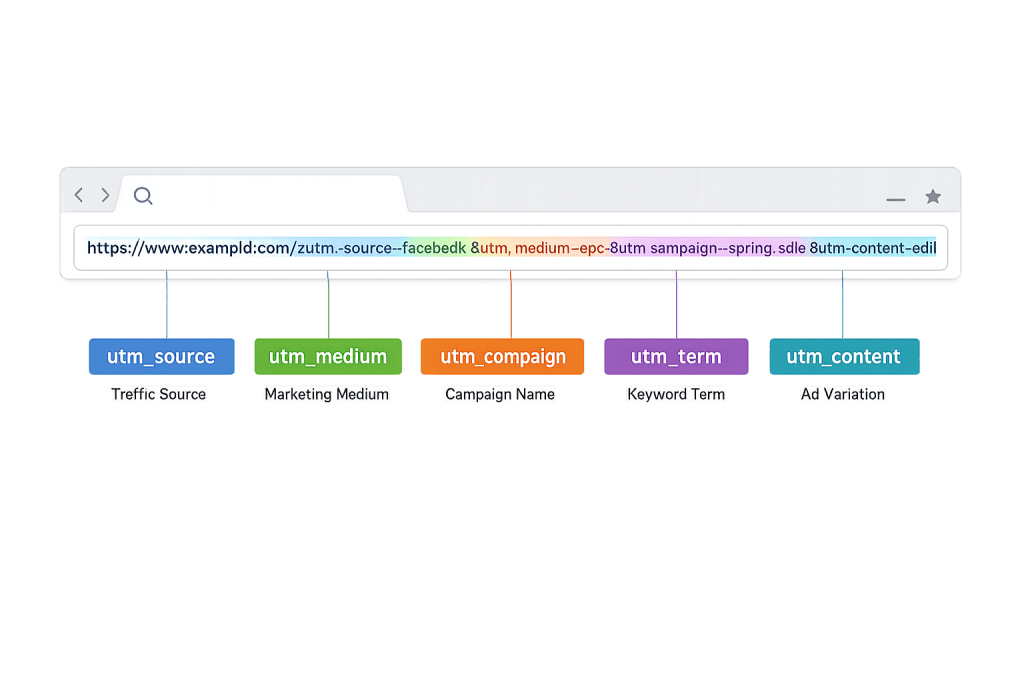
How UTM Parameters Work
A UTM-tagged URL consists of your base destination URL followed by a ? and one or more parameter pairs in the format parameter=value. Multiple parameters are separated by &.
A typical UTM URL looks like this:
The five standard UTM parameters are:
utm_source— Identifies where the traffic originates. Examples:google,facebook,newsletter,linkedin. Required.utm_medium— Describes the marketing channel or delivery method. Examples:cpc,email,social,display,organic. Required.utm_campaign— Names the specific campaign. Examples:spring-sale,brand-awareness-q1,product-launch. Required.utm_term— Identifies the paid keyword that triggered the ad. Used primarily for PPC campaigns. Optional.utm_content— Distinguishes between different versions of the same ad or link — useful for A/B testing creative or comparing multiple links within a single email. Optional.
When a visitor arrives via a tagged URL, GA4 captures those parameter values and reports on them under Traffic acquisition, allowing you to filter sessions, conversions, and revenue by source, medium, campaign, and more.
Purpose & Benefits
1. Accurate Campaign Attribution
Without UTM tagging, analytics platforms often misattribute or underreport traffic from email and social campaigns. Email clicks frequently show up as “direct” traffic when parameters are missing. UTMs correct this by explicitly declaring where the traffic came from, giving your digital marketing team accurate data on which campaigns are actually driving visits and conversions — not just best guesses based on correlation.
2. Channel-Level Performance Comparison
UTM parameters let you compare performance across every marketing channel using the same data set. You can see that your Google Ads campaign drove 200 visits with a 3% conversion rate, while your email campaign drove 150 visits with a 6% conversion rate — and make budget decisions accordingly. This kind of apples-to-apples comparison is only possible when every channel is tagged consistently. PPC campaigns and email both become measurable with the same level of precision.
3. Creative and Content Testing
The utm_content parameter is particularly valuable for testing. Tag two versions of the same email with different content values (utm_content=blue-cta vs. utm_content=red-cta) and you can see in GA4 which version drove more clicks and conversions. The same principle applies to comparing different ad creatives, different link placements within a page, or different social post formats — all pointing to the same destination.
Examples
1. Email Campaign Tracking
A business sends a promotional email announcing a sale. Every link in the email is tagged with utm_source=newsletter, utm_medium=email, and utm_campaign=summer-sale-2025. The header image link gets utm_content=header-image and the bottom text link gets utm_content=footer-text. In GA4, the marketing team can see not just how many email visitors converted, but which specific link placement drove the most clicks — informing the design of future campaigns.
2. Social Media Multi-Platform Comparison
A company shares the same blog post across Facebook, LinkedIn, and Instagram Stories in the same week. Each post uses a tagged URL with the same campaign value but different source values: utm_source=facebook, utm_source=linkedin, and utm_source=instagram. The medium is set to social for all three. At week’s end, the analytics report shows which platform drove the most engaged visitors — helping the team decide where to focus future organic and paid social effort.
3. Google Ads and PPC Tracking
A service business runs Google Ads with three different ad groups. Each destination URL includes utm_source=google, utm_medium=cpc, utm_campaign=brand-search, and a utm_term value corresponding to the keyword bid. In GA4, the business can see which keywords are generating sessions that convert, and which are generating expensive clicks that don’t. This data directly informs bid adjustments and budget reallocation for their PPC campaigns.
Common Mistakes to Avoid
- Inconsistent naming conventions —
utm_medium=Emailandutm_medium=emailare treated as two different values in GA4. Capitalization inconsistencies, typos, and varying spellings fragment your data. Establish a naming convention (all lowercase, hyphens instead of spaces) and document it in a shared UTM tracker. - Using UTMs on internal links — Adding UTM parameters to links that navigate users between pages on your own site overrides the original session source, effectively deleting the attribution data you just created. UTMs belong on external-facing links only.
- Over-tagging or under-tagging — Tagging some campaigns but not others leaves gaps in your attribution picture. Build UTM tagging into your publishing workflow as a default step for every external link you share.
- Skipping documentation — If multiple people are creating UTM tags without a shared reference, your analytics will quickly fill with inconsistent, one-off campaign names that are impossible to roll up into meaningful reports.
Best Practices
1. Establish a Naming Convention Before You Start
Decide on your conventions for source, medium, and campaign values before building your first UTM. Keep everything lowercase. Use hyphens rather than spaces (spaces get encoded as %20 in URLs and are harder to read). Create a shared UTM spreadsheet or naming guide that everyone who creates links can reference. Consistent naming is what makes UTM data actually reportable at scale.
2. Use Google’s Campaign URL Builder
Google provides a free tool (Campaign URL Builder) that generates properly formatted UTM-tagged URLs. It validates the structure, handles special character encoding, and ensures you don’t miss a required field. For teams managing many campaigns, UTM builder integrations within Google Sheets or dedicated UTM management tools can centralize link creation and documentation.
3. Connect UTM Data to Conversions, Not Just Traffic
Clicks and sessions are a starting point, but UTM data becomes most powerful when connected to conversion events and revenue. In GA4, configure your key conversion events (form completions, purchases, phone calls) and monitor them by session source/medium and campaign. Tracking which UTM source drives converting visitors — not just visitors — is what allows you to make informed decisions about where to invest your marketing budget.
Frequently Asked Questions
What does UTM stand for?
UTM stands for Urchin Tracking Module. Urchin was a web analytics software company acquired by Google in 2005, whose technology became the foundation for Google Analytics. The UTM parameter format was part of Urchin’s tracking system and carried over when Google built Google Analytics — which is why the parameter names still use the “utm_” prefix.
Do UTM parameters affect SEO?
No. UTM parameters are not read by search engine crawlers for ranking purposes. Google ignores them when indexing pages. However, it’s worth noting that if you use UTM parameters on links you share publicly (like in forums or press releases), those URLs can get indexed as separate versions of a page — which is why it’s good practice to add UTMs only to links shared through trackable, closed-loop channels like email or ads.
Are UTM parameters case-sensitive?
Yes. utm_source=Facebook and utm_source=facebook will appear as two separate sources in Google Analytics. Always use consistent casing — lowercase is the standard convention — to avoid fragmented reports.
What’s the difference between utm_source and utm_medium?
utm_source identifies the specific origin of the traffic — the name of the website, platform, or newsletter list. utm_medium describes the general marketing channel or delivery mechanism. For example, if someone clicks an ad on Facebook, the source is facebook and the medium is cpc (cost per click) or paid-social, depending on your convention.
Do I need to use all five UTM parameters?
No. utm_source, utm_medium, and utm_campaign are the required three for most use cases. utm_term and utm_content are optional and most valuable for granular PPC tracking and A/B testing respectively. Start with the required three and add the optional ones when the specific tracking need arises.
Related Glossary Terms
- Google Analytics
- PPC (Pay-Per-Click)
- Digital Marketing
- Conversion Rate Optimization (CRO)
- Organic Search
- Backlink
- Website Session
- Website Engagement Rate
How CyberOptik Can Help
Getting UTM tracking right is foundational to measuring whether your marketing is actually working. Without clean tracking data, it’s nearly impossible to know which campaigns deserve more budget and which should be cut. Our marketing team sets up proper UTM frameworks, configures GA4 conversion tracking, and builds reports that connect campaign activity to real business outcomes. Whether you need help with PPC management, a broader digital marketing strategy, or just getting your analytics in order, we can help. Explore our marketing services or get in touch.


