
Scope in web development refers to the defined boundaries of a project — what is included, what is excluded, what will be delivered, and by when. A clearly written scope document turns a general idea (“we need a new website”) into a set of specific, agreed-upon deliverables that both the client and the development team use to guide the project from start to finish.
Scope is foundational to every web project. It prevents misunderstandings, sets realistic expectations, and gives both parties a shared reference point when questions arise mid-project. Poorly defined scope is one of the most common causes of project delays, budget overruns, and client-agency friction. When scope is clear from the start — even when that means explicitly documenting what the project does not include — everyone works more efficiently and the final result more closely matches what was envisioned.
Key Concepts in Project Scope
A well-defined web project scope typically covers:
- Deliverables — The specific outputs: pages, features, integrations, content types, and functionality to be built.
- Exclusions — What the project will not include. Explicitly stating this prevents assumptions. (“Mobile app development is out of scope.”)
- Timeline — Key milestones and the target completion date.
- Budget — The agreed financial boundary for the project.
- Stakeholders — Who is responsible for approvals, content delivery, and decisions on the client side.
- Revision rounds — How many rounds of changes are included before additional work is billed separately.
In web design, scope documents often reference wireframes and design systems as planning tools — visual representations that make the scope tangible before development begins. A wireframe, for instance, defines the layout and functionality of each page, which becomes part of the scope.
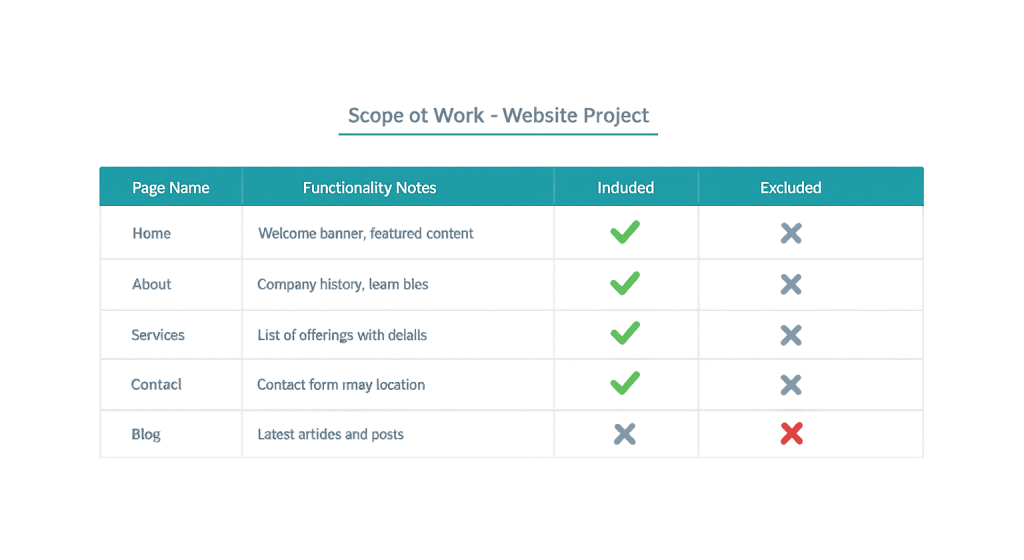
[Image: Example scope document excerpt showing a deliverables table with page names, functionality notes, and included/excluded columns]
Purpose & Benefits
1. Prevent Scope Creep
Scope creep is the gradual expansion of a project beyond its original boundaries — often without corresponding increases in budget or timeline. A documented scope gives the team a clear baseline for evaluating change requests. When a client asks to “add a member portal” during the final week of a website project, the scope document makes it clear that this is additional work requiring a separate agreement.
2. Align Expectations Before Work Begins
The most expensive misalignments happen late in a project. A thorough scope document — reviewed and approved by both parties before work starts — surfaces disagreements early when they’re easy and inexpensive to resolve. It’s far less costly to clarify that custom illustrations are outside scope during discovery than during the final design review.
3. Provide a Framework for Project Management
A clear scope breaks a complex project into manageable components. It feeds directly into timeline planning, resource allocation, and milestone tracking. For larger WordPress development projects with multiple phases, the scope document is the reference that keeps the work organized and accountable from kickoff to launch.
Examples
1. Website Redesign Project
A service business asks for a website redesign. The scope document specifies: 10 custom pages, contact and quote request forms, migration of existing blog posts, and integration with an existing CRM. It explicitly excludes new copywriting, photography, and e-commerce functionality. Without that last line, the client might reasonably expect product pages to be built; with it, both parties know exactly what “done” looks like.
2. E-Commerce Build
A retailer needs a WooCommerce store. The scope defines: product catalog migration (up to 200 products), payment gateway setup, shipping zone configuration, and a custom checkout flow. Custom product filtering and a loyalty program are explicitly noted as out of scope for this phase. This allows a phased approach where Phase 1 launches on time, and Phase 2 is scoped and budgeted separately.
3. Scope Change Mid-Project
Midway through a WordPress development project, the client requests adding a job board to the site. Because the original scope is documented, the agency can evaluate this as a change request — estimate the additional time and cost, issue a change order, and adjust the timeline accordingly. Without a baseline scope, this kind of addition often becomes a source of conflict over who owes what.
Common Mistakes to Avoid
- Starting work before scope is approved — Beginning development based on a verbal agreement or a vague email chain is a setup for disputes. Always get written sign-off on the scope before committing resources.
- Writing scope that’s too vague — “Build a website” is not a scope. Each deliverable should be specific enough that both parties would agree on whether it’s been completed. “5-page website with responsive design, contact form, and Google Analytics integration” is a scope.
- Forgetting to document exclusions — What’s not included is as important as what is. Clients often assume features are included unless they’re told otherwise. Explicit exclusions protect everyone.
- Treating scope as immovable — Scope can and should evolve when business needs change. The key is managing changes formally through a change order process, not absorbing them silently.
Best Practices
1. Build the Scope From Discovery, Not Assumptions
The best scope documents come from a discovery phase where the agency asks detailed questions about goals, audience, content, integrations, and technical requirements before committing to deliverables. This is especially important for WordPress development projects where custom functionality requirements often reveal themselves only through careful questioning.
2. Use Wireframes to Anchor Page-Level Scope
For design-heavy projects, wireframes and even a defined design system make scope concrete. Rather than describing a homepage in words, a wireframe shows the sections, content blocks, and interactions that are (and aren’t) included. This reduces ambiguity significantly and gives both parties a visual reference for sign-off.
3. Define the Change Order Process Upfront
Include language in the scope document (or the accompanying contract) describing how changes will be handled: how they’re requested, how they’re estimated, and how they’re approved. When the process is agreed upon before any change requests arise, the conversation around “this is additional scope” is professional rather than contentious.
Frequently Asked Questions
What’s the difference between scope and requirements?
Scope defines the boundaries of the project — what’s in and what’s out. Requirements go deeper within those boundaries, specifying exactly how each deliverable should function or appear. Think of scope as the fence around the project and requirements as the detailed specifications for everything inside the fence.
Who writes the scope document?
Typically the agency or development team drafts the scope based on client input gathered during a discovery or briefing process. The client reviews, revises, and approves it. Both parties should sign off on the scope before work begins — it becomes the shared reference point for the entire project.
What happens when scope needs to change?
Legitimate scope changes are handled through a formal change order: the new work is described, a cost and timeline impact is estimated, and both parties agree in writing before proceeding. This keeps the project relationship healthy and ensures no one is surprised by budget or deadline changes.
How detailed should a scope document be?
Detailed enough that both parties would agree on whether each item has been delivered. For simple sites, a one-page summary with a clear deliverables list may be sufficient. For complex projects with custom functionality, integrations, or phased delivery, the scope document may run several pages. Err on the side of more specificity, not less.
Is scope the same as a contract?
Scope is typically part of a contract, not the contract itself. The contract covers the legal relationship, payment terms, intellectual property, and other terms. The scope — often attached as a statement of work or exhibit — defines the specific deliverables and exclusions for a given project.
Related Glossary Terms
How CyberOptik Can Help
Clear scope is the foundation of every successful web project. Our discovery process is designed to surface requirements, set expectations, and document deliverables before a line of code is written — so projects stay on track and final results match what was planned. Whether you need a complete redesign, custom functionality, or a phased development plan, we build from a solid scope. Get in touch to discuss your project or explore our WordPress development services.


