
Orphan page is a page on your website that has no internal links pointing to it from any other page on the site. It exists in your website’s files or database, may even appear in your sitemap, but because no other page links to it, search engine crawlers have no natural path to discover it. The term “orphan” is accurate — these pages have been cut off from the connected structure that gives the rest of your site its navigational and ranking logic.
Orphan pages are more common than most site owners realize, and they tend to accumulate over time. They often result from site redesigns that change navigation, content migrations that leave old pages behind, deleted categories that break internal links, or simply pages that were created and never properly linked into the site structure. Research shows orphan pages can consume 26% of a site’s crawl budget on average while generating only 5% of organic traffic — an efficiency problem that compounds the longer the issue goes unaddressed.
[Image: Site architecture diagram showing normal pages connected by internal link arrows vs. an orphan page with no incoming arrows, isolated from the rest of the structure]
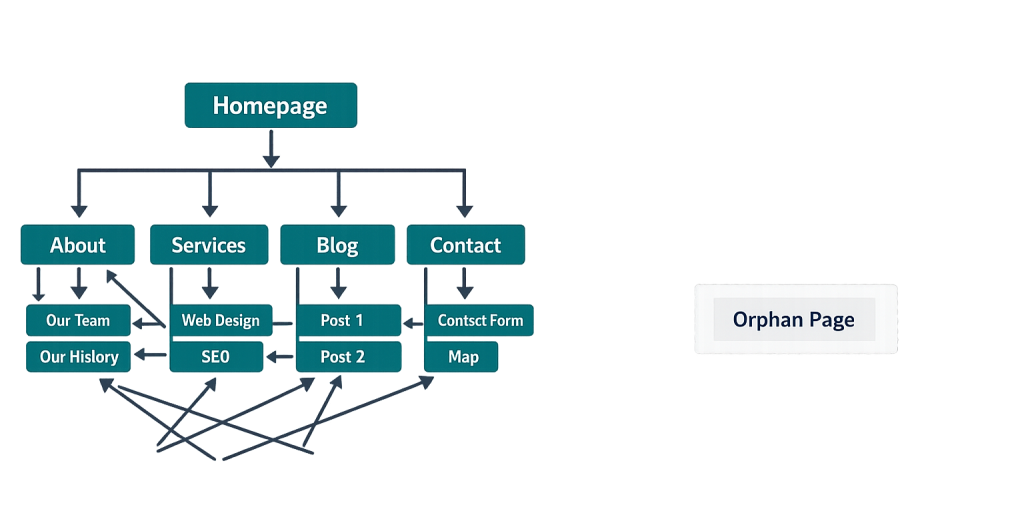
How Orphan Pages Are Created
Understanding how orphan pages form helps prevent them:
- Site redesigns — When navigation menus are restructured, pages that aren’t included in the new menu lose their primary internal links overnight.
- Content migrations — Moving content to a new CMS or URL structure sometimes leaves old pages live without updating internal links to point to them.
- Category and taxonomy changes — Deleting or reorganizing categories in WordPress can strip the internal linking that archive pages provided to individual posts.
- Incomplete content publishing — Pages created as drafts, published before being linked from anywhere, and then forgotten.
- Staging-to-live migrations — Content created on a staging site that gets published live without being connected to the navigation or existing content.
Search engines primarily discover content by following links. A page that appears only in a sitemap receives less crawl priority than one that’s well-integrated into the site’s internal link structure.
Purpose & Benefits of Fixing Orphan Pages
1. Improved Crawl Efficiency
Every orphan page that sits in your sitemap without internal links forces Googlebot to retrieve it through brute-force sitemap discovery rather than natural link following. By fixing orphan pages — either by creating internal links to them or by removing/redirecting pages that serve no purpose — you concentrate crawl resources on the pages that matter most. This is particularly impactful for larger sites where crawl budget is a real constraint.
2. Restored Link Equity Flow
Internal links distribute link equity (PageRank) throughout your site. Orphan pages receive none of this flow because no page links to them. When you reconnect an orphan page to the site structure, it becomes eligible to receive equity from high-authority pages that link nearby. Our SEO services include internal link audits that identify these equity flow gaps.
3. Better User Experience and Navigation
A page your visitors can’t discover through normal navigation isn’t serving its intended purpose. Reconnecting orphan pages — or consolidating duplicate orphaned content into stronger pages — improves the coherence of your site’s information architecture and ensures visitors can find all of the content you’ve created for them.
Examples
1. Post-Redesign Orphan Discovery
A company redesigns its website and simplifies its navigation. Six months later, an SEO audit reveals 40 blog posts from the previous site structure are now orphaned — they were excluded from the new category architecture but remain live and indexed. The fix: add a blog archive page with links to all posts, and update several related posts to cross-link to the orphaned content.
2. Landing Pages Left Behind After a Campaign
A business runs a seasonal promotional campaign and creates a dedicated landing page for it. When the campaign ends, the page is left live but removed from the main navigation. The page now exists as an orphan — potentially confusing visitors who find it through old social posts or bookmarks, and wasting crawl budget on content that’s no longer being promoted.
3. Documentation or Resource Pages Never Linked From Content
A SaaS company publishes a detailed feature guide to its website but never links to it from its blog posts, product pages, or navigation. Despite being high-quality content, the page earns no organic traffic because search engines encounter it infrequently and users can’t discover it through normal navigation.
Common Mistakes to Avoid
- Assuming sitemaps solve the problem — Including a page in your sitemap tells search engines it exists, but it doesn’t give the page the authority signals that internal links provide. Sitemaps are a fallback, not a substitute for proper internal linking.
- Deleting orphan pages without checking their value — Before removing an orphaned page, check its organic traffic history, whether it has any external backlinks, and whether the content could be updated and reintegrated. Some orphan pages are worth rescuing.
- Only auditing obvious navigation pages — Blog posts, tag pages, old product pages, and campaign landing pages are the most common orphan categories. Any audit that only looks at primary navigation pages will miss them.
- Fixing orphans once without building prevention into the publishing workflow — New content is regularly published without being linked from anywhere. Building a checklist that requires new pages to be linked before going live prevents future orphans.
Best Practices
1. Conduct a Regular Internal Link Audit
Use a crawl tool (Screaming Frog, Ahrefs Site Audit, or Semrush) combined with your sitemap to identify pages that receive zero internal links. Schedule this audit quarterly or whenever a significant site change occurs — after redesigns, migrations, or major content reorganizations. Cross-reference with Google Search Console to see which orphaned pages are actually indexed.
2. Connect Valuable Orphans Back Into the Site Structure
For every orphan page worth keeping, create at least two or three contextually relevant internal links from other pages. The ideal links come from pages on related topics — a blog post about SEO audits linking to an orphaned page about technical SEO, for example. This creates a natural navigational path and begins restoring link equity flow to the reconnected page.
3. Remove or Redirect Pages That Serve No Purpose
Not every orphan page is worth saving. Old campaign landing pages, outdated content with no traffic or backlinks, and duplicate pages from migrations are often better removed (with a 301 redirect to a relevant replacement) than reintegrated. Cleaning these pages reduces crawl waste and prevents low-quality content from diluting your site’s overall perceived quality.
Frequently Asked Questions
How do I find orphan pages on my website?
The most reliable method is to crawl your site with a tool like Screaming Frog or Ahrefs and compare the pages discovered during the crawl against your sitemap and server logs. Pages that appear in your sitemap or server logs but receive zero internal links from other pages are your orphans.
Do orphan pages hurt my rankings?
They can, indirectly. Orphan pages that consume crawl budget reduce how efficiently Googlebot spends time on your more important pages. They also miss out on any link equity distribution from your existing content. If an orphaned page previously ranked well and was then abandoned, the drop in internal links may contribute to ranking loss over time.
Are all orphan pages bad for SEO?
Not necessarily. Intentionally isolated pages — like private thank-you pages after form submissions, login-gated resources, or temporary testing pages — may be purposefully unlinked. The concern is with pages that are meant to rank and drive traffic but have inadvertently lost their internal link connections.
How often should I audit for orphan pages?
After any significant site change — redesign, migration, major navigation update, or large-scale content deletion. For actively maintained sites, a quarterly audit is a reasonable cadence. For smaller sites with infrequent changes, an annual audit as part of a broader SEO health check is usually sufficient.
Related Glossary Terms
- Internal Linking
- Crawl Budget
- Sitemap
- Technical SEO
- SEO (Search Engine Optimization)
- Canonical URL
- Google Search Console
How CyberOptik Can Help
Orphan pages are one of those SEO issues that are invisible until you look for them — and they’re common on any site that’s been through a redesign or content migration. We conduct thorough site audits as part of our SEO engagements, identifying orphaned content and building the internal link strategy needed to reconnect it properly. Contact us for a free website review or learn more about our SEO services.


