
HTTP (Hypertext Transfer Protocol) is the foundational communication protocol of the World Wide Web. It defines the rules for how data is requested and transferred between a web browser (the client) and a web server. When you type a URL into your browser and press Enter, HTTP governs the request your browser sends and the response the server returns — including the HTML, images, CSS, and other files that make up the page you see.
HTTP has been the backbone of web communication since the early 1990s. While HTTPS — the encrypted version — is now the standard for all modern websites, understanding HTTP clarifies why HTTPS exists, what the padlock icon in a browser’s address bar actually means, and why website security is not just a technicality.
[Image: Diagram showing the request-response cycle between a browser and a web server over HTTP]
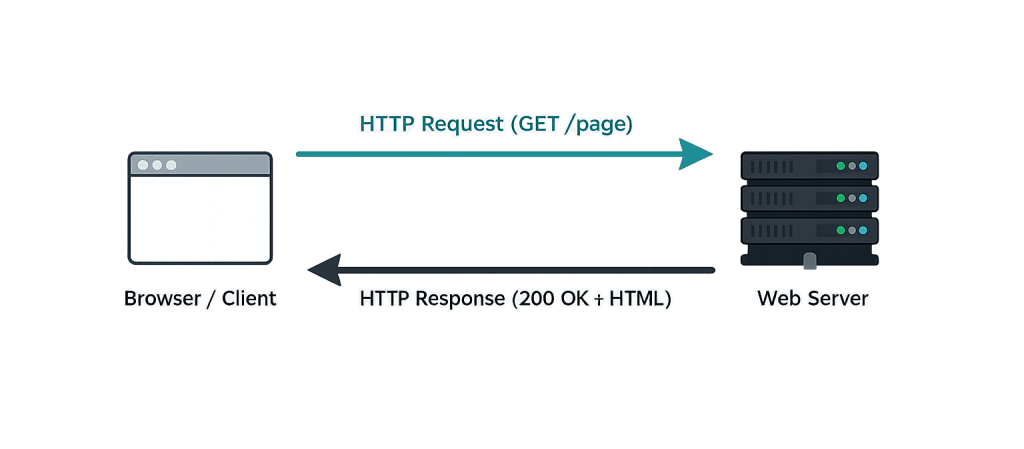
How HTTP Works
HTTP operates as a request-response protocol. Every interaction follows this basic cycle:
- The browser sends a request — When you click a link or enter a URL, your browser constructs an HTTP request that specifies what resource it wants (the URL path) and how it wants it (the HTTP method).
- The server processes the request — The web server receives the request, locates the requested resource, and prepares a response.
- The server sends a response — The response includes a status code (such as
200 OK,404 Not Found, or301 Moved Permanently) and the requested content (or an explanation of why it couldn’t be provided). - The browser renders the content — The browser reads the HTML in the response and may make additional HTTP requests for linked resources (images, CSS files, JavaScript files) needed to display the full page.
HTTP methods define the type of action being requested:
– GET — Request a resource (loading a webpage)
– POST — Submit data (submitting a form)
– PUT / PATCH — Update a resource
– DELETE — Remove a resource
HTTP operates on port 80 by default. HTTPS operates on port 443. When a browser connects to a site, the port tells the server which type of connection is being made.
The critical limitation of HTTP is that data travels as plaintext. An HTTP request or response can be intercepted and read by anyone monitoring the network connection — a fundamental security problem that HTTPS resolves.
Purpose & Benefits
1. Enable Communication Between Browsers and Servers
HTTP is the protocol that makes web browsing possible. Without a standard set of rules for how requests and responses are structured, browsers and servers from different developers and organizations couldn’t interoperate. HTTP established that standard in the early web and enabled the global web as we know it. Every site — including WordPress sites — runs on HTTP at the protocol level, with HTTPS layering encryption on top.
2. Define the Status Code System
HTTP’s status codes provide a structured way for servers to communicate outcomes. 200 OK means success. 404 Not Found means the resource doesn’t exist. 301 Moved Permanently means the content has moved to a new URL — the basis for redirects. 500 Internal Server Error signals a server-side problem. Understanding these codes helps diagnose website issues, and our WordPress hosting team references them daily when troubleshooting client sites.
3. Foundation for Modern Web Infrastructure
HTTP is the layer on which everything from DNS resolution to CDN caching is built. Content delivery networks cache HTTP responses to serve content from servers closer to users, reducing latency. Caching headers transmitted via HTTP tell browsers and servers how long to store a resource. Understanding HTTP helps demystify how performance optimization techniques like caching actually work.
Examples
1. Loading a Webpage
When a visitor loads a WordPress page, the process begins with an HTTP GET request:
- Browser sends:
GET /about/ HTTP/1.1to the server at the site’s IP address - Server responds:
HTTP/1.1 200 OKfollowed by the HTML content - Browser reads the HTML and sends additional requests for images, CSS, and JavaScript files
Each of these sub-requests is a separate HTTP transaction. A single page load can involve dozens of HTTP requests — which is one reason page load speed optimization focuses on reducing the number of requests and the size of each response.
2. A Form Submission
When a visitor submits a contact form on a WordPress site, the browser sends an HTTP POST request:
- Browser sends:
POST /contact-form/ HTTP/1.1with the form field data in the request body - Server receives the data, processes it (sending the email, saving to the database), and responds
- The server responds with either
200 OK(success) or a redirect to a confirmation page
This is how form validation works at the protocol level — the server receives the data and must validate it before processing.
3. A 301 Redirect
When a business changes its URL structure — merging two pages or moving content to a new path — the server issues an HTTP 301 response:
- Browser requests:
GET /old-page/ HTTP/1.1 - Server responds:
HTTP/1.1 301 Moved Permanentlywith aLocation: /new-page/header - Browser automatically requests
/new-page/and the visitor lands on the correct content
This HTTP mechanism is fundamental to URL management, SEO preservation during site migrations, and maintaining clean URL structures on WordPress sites.
Common Mistakes to Avoid
- Running a website on HTTP instead of HTTPS — HTTP transmits data in plaintext, meaning passwords, form submissions, and personal data can be intercepted on unsecured networks. Every modern website should use HTTPS with a valid SSL certificate. Google also uses HTTPS as a ranking signal.
- Ignoring HTTP status codes in server logs — Error codes like
404and500appearing frequently in your server logs signal real problems.404errors can indicate broken links affecting user experience and SEO;500errors indicate server-side failures that may be intermittent and easy to miss. - Not forcing HTTP to HTTPS redirects — If your site is configured for HTTPS but HTTP requests aren’t automatically redirected, some visitors may access the unsecured version. Configure server-level or WordPress-level redirects to ensure all HTTP traffic goes to HTTPS.
- Confusing HTTP methods — Using a
GETrequest to submit sensitive data (like form passwords) exposes that data in server logs and browser history. Sensitive form submissions should always usePOST.
Best Practices
1. Ensure All Traffic Redirects to HTTPS
Configure your server or WordPress site to automatically redirect any HTTP requests to their HTTPS equivalents. This is typically done at the web server level (Apache or Nginx configuration) or through a WordPress plugin. Once HTTPS is established, all HTTP traffic should be permanently redirected using 301 redirects to avoid split traffic and maintain SEO consistency.
2. Monitor HTTP Status Codes Regularly
Use tools like Google Search Console, Screaming Frog, or your server’s access logs to identify unexpected status codes. A spike in 404 errors may indicate recently deleted or moved content. Repeated 500 errors suggest server or application problems. Catching these issues early prevents user experience degradation and SEO damage. Our WordPress hosting clients benefit from proactive monitoring as part of their managed hosting plan.
3. Understand Caching Headers
HTTP caching headers (Cache-Control, Expires, ETag) tell browsers and intermediate servers how long to store a resource before requesting a fresh copy. Proper caching configuration significantly reduces server load and improves page load times — a key factor in Core Web Vitals performance. These headers are configured at the server level and should be part of any speed optimization strategy.
Frequently Asked Questions
What’s the difference between HTTP and HTTPS?
HTTP transmits data as unencrypted plaintext. HTTPS adds a layer of SSL/TLS encryption, meaning data is scrambled during transmission and can only be read by the intended recipient. HTTPS also verifies the identity of the server through its SSL certificate, protecting visitors from connecting to impersonator sites. All websites should use HTTPS.
Does HTTP affect website speed?
HTTP itself is fast, but its version matters. HTTP/1.1 (the long-standing standard) handles one request at a time per connection. HTTP/2 allows multiple requests simultaneously over a single connection, reducing page load times significantly. HTTP/3, the newest version, improves this further using the QUIC protocol. Most modern web hosts and WordPress hosting environments support HTTP/2 and sometimes HTTP/3 automatically.
What happens if my website still uses HTTP?
Browsers like Chrome flag HTTP sites as “Not Secure” in the address bar. Visitors see a warning that may cause them to leave. Google uses HTTPS as a ranking factor, so HTTP sites may rank lower in search results. Form submissions and login data travel unencrypted, creating security risks. There are no good reasons to run a modern website without HTTPS.
What are the most important HTTP status codes to know?
The ones you’ll encounter most often: 200 OK (success), 301 Moved Permanently (redirect — important for SEO), 302 Found (temporary redirect), 404 Not Found (page missing), 403 Forbidden (access denied), and 500 Internal Server Error (server-side problem). Each signals a specific condition that may require attention.
Is HTTP a security vulnerability?
Using HTTP doesn’t mean your site will be immediately hacked, but it does mean data transmitted to and from the site travels unencrypted. On public Wi-Fi networks, HTTP traffic can be intercepted and read with relatively simple tools. The risk is highest for sites that handle login credentials, contact form data, or payment information — but any site collecting visitor information should use HTTPS.
Related Glossary Terms
- HTTPS (Hypertext Transfer Protocol Secure)
- SSL Certificate
- DNS (Domain Name System)
- Caching
- Core Web Vitals
- CDN (Content Delivery Network)
- Technical SEO
How CyberOptik Can Help
Site performance directly impacts your search rankings and user experience. We offer managed WordPress hosting and speed optimization services to keep your site fast and reliable — which includes proper HTTP/HTTPS configuration, redirect management, and caching setup. If your site is still running on HTTP, or if you’re experiencing performance issues tied to your server configuration, we can help resolve them. Learn about our hosting solutions, our speed optimization services, or get in touch to discuss your site’s configuration.


