Downtime refers to any period when a website is unavailable or non-functional — when visitors who attempt to access the site receive an error, an unresponsive page, or a blank screen instead of the intended content. Downtime can be complete (the site is entirely offline) or partial (certain pages, features, or functions fail while others continue to work). Regardless of severity, any period of unavailability translates directly into lost visitors, lost revenue, and erosion of the trust your website has built over time.
The business impact of downtime is significant. Industry research indicates the average cost of downtime across organizations is approximately $14,000 per minute — a figure that may seem remote for a small business website until you consider the compounding effects: a prospect trying to contact you for the first time who can’t load your site, an e-commerce transaction that fails at checkout, or a service inquiry form that submits to nowhere. Smaller businesses face lower absolute dollar costs but often higher proportional impact given their thinner margins and fewer alternative channels.
What Causes Website Downtime
Understanding common causes helps prioritize prevention:
- Server hardware failure — Physical failure of the server hosting your site
- Network outages — Internet connectivity issues at the data center level
- Hosting resource limits — Traffic spikes or runaway processes exhausting shared server resources on shared hosting plans
- Software errors — Plugin conflicts, failed WordPress core updates, or PHP errors that prevent pages from rendering
- DDoS attacks — Distributed Denial of Service attacks that overwhelm server resources with traffic
- Database connection failures — The database server becomes unavailable or connection limits are reached
- Expired SSL certificate — Browsers block access to sites with expired or misconfigured SSL certificates
- Domain/DNS configuration errors — DNS misconfiguration or an expired domain registration making the site unreachable
- Scheduled maintenance — Planned maintenance windows during which the site is intentionally taken offline
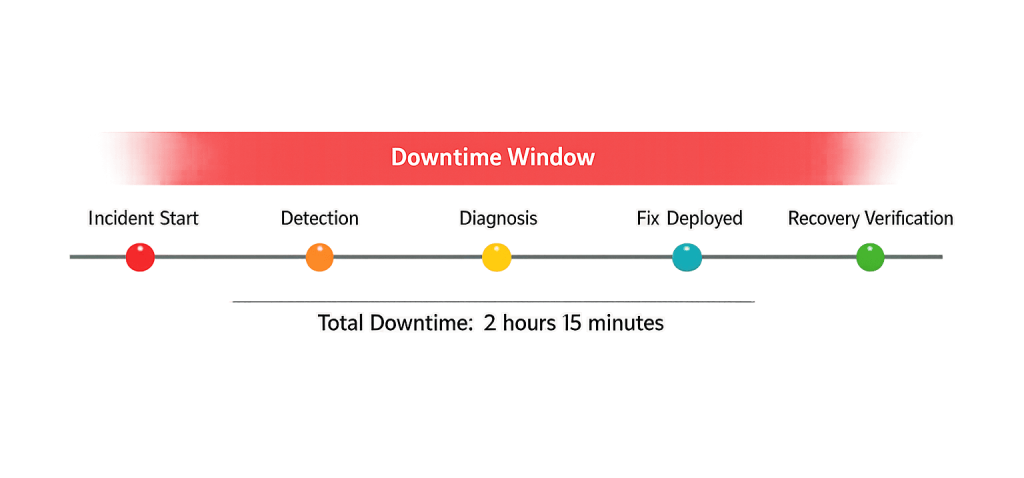
[Image: Timeline diagram showing a downtime incident from detection to resolution, with phases labeled: incident start, detection, diagnosis, fix deployed, and recovery verification]
Purpose & Benefits of Minimizing Downtime
1. Protects Revenue and Conversions
Every minute a site is down is a minute potential customers can’t reach you, submit forms, or complete purchases. For e-commerce sites, even brief periods of downtime during peak traffic can mean meaningful lost revenue. For service businesses, a prospect who can’t load your site once may not try again. Our WordPress hosting services are built with reliability and uptime monitoring as core features.
2. Preserves Search Rankings
Extended or repeated downtime can affect your search engine rankings. If Googlebot consistently encounters downtime when it attempts to crawl your site, it may reduce crawl frequency. Prolonged unavailability sends negative signals about site reliability. Recovery after significant downtime may require time to rebuild those signals. Uptime directly supports your SEO foundation.
3. Maintains User Trust
A site that’s frequently unavailable or unreliable signals to visitors that the business behind it isn’t operating at a high level — even if the actual business is excellent. Trust, once lost, is hard to rebuild. Consistent uptime is the baseline expectation users bring to every site visit, and meeting it is simply the cost of operating a credible online presence.
Examples
1. Plugin Conflict After an Update
A WordPress site’s owner updates a set of plugins through the admin dashboard. One of the updates introduces a conflict with another plugin, causing a PHP fatal error. The site goes down and displays a white screen or error message. The fix requires rolling back the problematic plugin or resolving the conflict — work that’s much faster when automated backups are available and a maintenance protocol is in place.
2. Hosting Resource Exhaustion on Shared Hosting
A small business site on a shared hosting plan publishes a post that goes modestly viral — traffic increases to 10x normal levels for several hours. The shared server, already serving resources for dozens of other sites, reaches its CPU or connection limits and begins refusing requests. Visitors see 503 errors. Upgrading to a plan with dedicated resources or better traffic handling prevents this from recurring.
3. DDoS Attack on a Business Website
A mid-size service business notices their site went offline with no obvious explanation. Their host reports an unusually high volume of requests from distributed IP addresses — a DDoS attack. Without DDoS mitigation (offered by services like Cloudflare), the server is overwhelmed. Hosts with enterprise-grade infrastructure handle these attacks transparently; sites on basic shared plans are more vulnerable.
Common Mistakes to Avoid
- Not monitoring uptime proactively — Most downtime is discovered by a customer before the site owner. Free uptime monitoring services (UptimeRobot, Freshping) send instant notifications when your site goes down — giving you minutes or hours of response time before users complain.
- Updating plugins without a staging environment — Applying updates directly to a live site without testing them first is a leading cause of downtime from plugin conflicts. A staging site lets you verify updates work before deploying them to production.
- Relying solely on host-provided backups — Hosting providers can experience outages or data loss that affects backups. An independent, offsite backup solution is a secondary safety net that matters precisely when the host itself has a problem.
- Ignoring SSL certificate expiration — SSL certificates expire. Browsers block access to sites with expired certificates, creating effective downtime even when the server is running perfectly. Automated SSL renewal (via Let’s Encrypt or your certificate provider) prevents this entirely.
Best Practices
1. Choose Hosting with a Strong SLA and Infrastructure
Not all hosting is created equal. Look for managed WordPress hosting providers that offer a formal uptime Service Level Agreement (typically 99.9% or higher), server-level DDoS protection, and redundant infrastructure. The difference between 99.9% and 99.5% uptime is meaningful: 99.5% allows up to 43 hours of downtime per year; 99.9% allows under 9 hours.
2. Set Up Uptime Monitoring
Configure an uptime monitoring service to check your site every 1–5 minutes and send immediate alerts via email, SMS, or Slack when downtime is detected. This is one of the highest-value, lowest-effort protections you can put in place — and free tools make it accessible to any business. Our hosting and maintenance services include proactive monitoring.
3. Test and Maintain Your Recovery Process
A backup that’s never been tested is a backup of unknown reliability. Periodically restore a backup to a staging environment to verify it works. Document your recovery steps so they can be followed quickly under pressure. The goal isn’t just preventing downtime — it’s ensuring fast recovery when prevention fails.
Frequently Asked Questions
What’s an acceptable level of uptime for a business website?
Industry standard for production websites is 99.9% uptime or better, which translates to less than 9 hours of downtime per year. High-availability setups aim for 99.99% (under 53 minutes per year). For most small business sites, 99.9% from a quality managed host is a reasonable baseline; e-commerce and high-traffic sites should demand higher.
How quickly will Google penalize a site for downtime?
Google is fairly tolerant of brief, occasional downtime — Googlebot encounters server errors occasionally and simply retries later. Extended periods of unavailability (many hours or days) begin to affect crawl frequency and can eventually impact rankings if the site appears persistently unreliable. Brief maintenance downtime is generally not a problem if it’s infrequent and resolved quickly.
How do I find out why my site went down?
Start with your hosting provider’s status page and support logs. Error logs in your hosting control panel often contain the specific PHP or database error that triggered the outage. If the cause is unclear, your hosting provider’s support team can usually identify the root cause from server logs. A developer can diagnose and resolve plugin conflicts, database errors, and configuration issues.
Can I schedule downtime for maintenance without hurting SEO?
Minimal scheduled maintenance downtime (a few minutes to a couple of hours) is unlikely to harm SEO. Best practice is to return a 503 (Service Unavailable) HTTP status code with a Retry-After header during scheduled maintenance, which signals to Googlebot that the outage is temporary and it should come back later. Don’t use 404 (Not Found), which implies the page is permanently gone.
What’s the difference between downtime and slow load times?
Downtime means the site is completely inaccessible — requests time out or return errors. Slow load times mean the site is technically available but responding poorly. Both affect user experience and Core Web Vitals scores, but they have different causes and solutions. Downtime is usually an infrastructure or configuration issue; slow load times are performance optimization issues.
Related Glossary Terms
- Uptime
- WordPress Hosting
- DDoS (Distributed Denial of Service)
- Backup
- Shared Hosting
- SSL Certificate
- Staging Site
How CyberOptik Can Help
Site performance directly impacts your search rankings and user experience. We offer managed WordPress hosting with enterprise-grade infrastructure, proactive uptime monitoring, and automated backup systems — so downtime events are caught fast and resolved faster. If you’re on hosting that’s failing to keep pace, we can help you move to something better. Learn about our hosting solutions or explore our speed optimization services, or contact us.