DMARC (Domain-based Message Authentication, Reporting and Conformance) is an email authentication protocol that builds on SPF and DKIM to give domain owners control over what happens when emails claiming to come from their domain fail authentication checks. A DMARC policy, published as a TXT record in your domain’s DNS, tells receiving mail servers whether to deliver, quarantine, or reject emails that don’t pass authentication — and optionally sends you reports about what authentication activity is occurring for your domain.
DMARC’s significance increased sharply in February 2024, when Google and Yahoo began requiring DMARC records for all bulk senders. Microsoft followed with similar requirements in 2025. The effect was immediate: more than half a million domains published their first DMARC record in the weeks following Google and Yahoo’s announcement. For businesses sending email newsletters, marketing campaigns, or transactional notifications — or simply those who want to protect their domain from being spoofed — DMARC configuration is now a fundamental requirement, not a technical nicety.
[Image: Flow diagram showing email received → SPF check → DKIM check → DMARC alignment check → policy applied (deliver/quarantine/reject)]
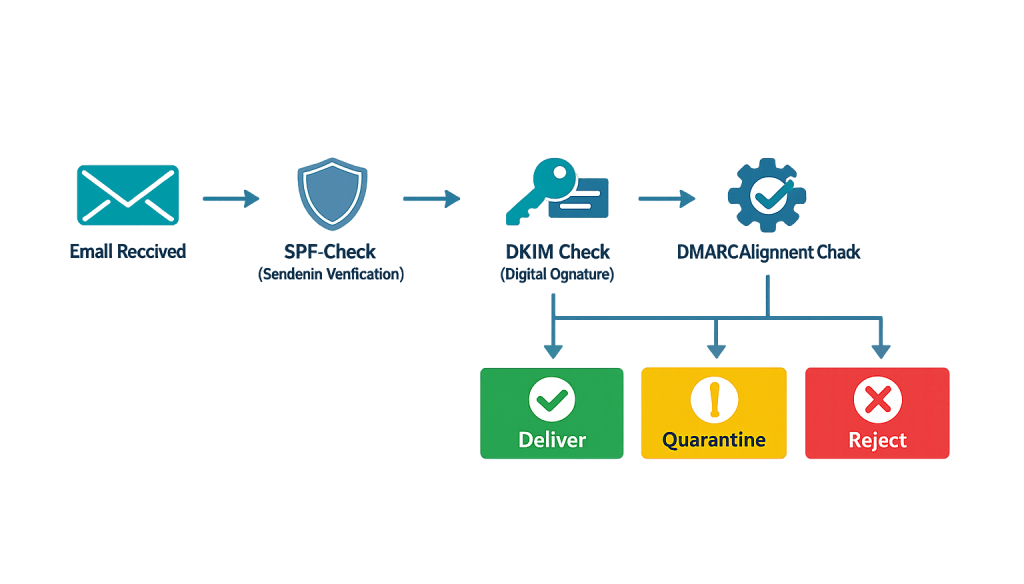
How DMARC Works
DMARC operates as the policy layer above SPF and DKIM. It defines three things:
1. Alignment — DMARC checks whether the “From” domain in the email header aligns with the domain authenticated by either SPF or DKIM. Spoofed emails often pass individual SPF or DKIM checks on a different domain while using a legitimate domain in the visible “From” address. DMARC alignment closes this gap.
2. Policy (p=) — The core of every DMARC record, specifying what to do when alignment fails:
– p=none — Monitor only. Emails that fail are delivered normally, but reports are sent to you. This is the starting point for most implementations.
– p=quarantine — Emails that fail authentication are sent to the spam folder.
– p=reject — Emails that fail authentication are blocked entirely at the receiving server level.
3. Reporting (rua=/ruf=) — DMARC can send aggregate reports (rua) and forensic reports (ruf) to an email address you specify. These reports show you what authentication activity is occurring for your domain — including legitimate sending sources you may have missed and any spoofing attempts.
A basic DMARC record looks like this:
_dmarc.yourdomain.com IN TXT "v=DMARC1; p=none; rua=mailto:[email protected]"
Purpose & Benefits
1. Prevents Domain Spoofing and Phishing
Without DMARC, anyone can send an email that displays your domain in the “From” field — even if they have no connection to your domain. These spoofed emails are used to conduct phishing attacks against your customers and partners, impersonating your business to steal credentials or money. A DMARC policy set to p=reject instructs receiving servers to block any email claiming to be from your domain that doesn’t pass authentication — protecting your reputation and your recipients. DMARC adoption increased 11 percentage points in 2024 as businesses recognized this need.
2. Fulfills Sender Requirements from Gmail, Yahoo, and Microsoft
Since February 2024, Google and Yahoo require all bulk senders — anyone sending 5,000 or more emails per day — to have a DMARC record with at least p=none. Microsoft added similar requirements in 2025 for outlook.com, hotmail.com, and live.com. This means that without a DMARC record, your bulk emails face delivery failures at the world’s most widely used email services. For marketing campaigns, autoresponder sequences, and automated notifications, DMARC compliance is now a prerequisite for reliable delivery.
3. Provides Visibility Into Your Email Ecosystem
DMARC’s reporting feature is valuable independent of enforcement. Aggregate reports sent to your rua address reveal every source sending email using your domain — your main email provider, your marketing platform, your CRM, your WordPress transactional email, and any unauthorized senders. Many businesses discover previously unknown sending services when they first enable DMARC reporting. This visibility lets you authenticate legitimate services and identify spoofing attempts before they cause damage.
Examples
1. Starting with p=none for Safe Monitoring
A business setting up DMARC for the first time publishes a p=none record with a reporting address. Over four weeks, they receive aggregate reports showing that their domain sends email through Google Workspace and two other services they hadn’t configured DKIM for — a marketing platform and their WordPress site. They authenticate both using DKIM and SPF, confirm all legitimate sources are passing, then upgrade the policy to p=quarantine.
2. Blocking Domain Spoofing with p=reject
A financial services firm’s domain has been used in phishing emails targeting its clients. The firm implements DMARC with p=reject after carefully authenticating all legitimate sending services. Subsequent phishing attempts using the firm’s domain are now rejected at the receiving server level before reaching any inbox. The firm also receives forensic reports documenting each rejected spoofing attempt.
3. Multi-Brand Business with Subdomain Policy
A company with multiple sub-brands sends marketing emails from subdomains (brand1.company.com, brand2.company.com). DMARC can apply to subdomains as well as the root domain, using the sp= tag to specify subdomain policy. The company implements p=reject on the root domain and builds each subdomain’s authentication stack independently before enforcement, using DMARC reports to validate each one before tightening the policy.
Common Mistakes to Avoid
- Publishing p=reject without testing first — Jumping straight to a rejection policy before confirming all legitimate email sources are authenticated will cause your own emails to be blocked. Always start with
p=none, use reports to identify all sending sources, authenticate them, then progressively tighten top=quarantineandp=reject. - Not setting up a reporting address — A DMARC record without a
ruareporting address is blind. You publish the policy but receive no data about what’s happening. Always configure a reporting address to benefit from DMARC’s visibility features. - Forgetting third-party sending services — Marketing platforms, CRM systems, help desk software, and other tools that send email on your behalf all need to be covered by your authentication setup. Missing one means that service’s emails will fail DMARC alignment if you’ve set enforcement.
- Treating DMARC as a one-time setup — Email infrastructure changes over time. New services are added, providers change, sending practices evolve. Review your DMARC reports periodically to catch new unauthenticated senders before they become delivery problems.
Best Practices
1. Follow the Gradual Rollout Path
The proven DMARC implementation sequence: start with p=none and reporting → review reports for 2–4 weeks → authenticate all legitimate sources → move to p=quarantine with a low percentage (pct=10, then pct=25, etc.) → once comfortable, move to p=reject. This gradual approach prevents disruption while systematically closing authentication gaps.
2. Monitor Aggregate Reports Regularly
DMARC aggregate reports are sent daily or weekly depending on volume. Review them for new unauthenticated sources, unexpected sending volumes, or spoofing patterns. Free and paid DMARC monitoring services like Dmarcian or Valimail visualize these reports in dashboards that make interpretation straightforward without reading raw XML.
3. Configure DKIM Alignment Alongside DMARC
DKIM is more resilient than SPF for DMARC alignment because DKIM signatures survive email forwarding — SPF often breaks when email is forwarded. For the most robust DMARC implementation, ensure DKIM alignment is confirmed for all major sending services, not just SPF.
Frequently Asked Questions
Do I need DMARC even if I’m not a bulk email sender?
Yes. Even if you only send a few emails per day from your domain, DMARC protects your domain from being spoofed. Phishing attackers don’t target only high-volume senders — any business domain can be impersonated. A basic p=none DMARC record with reporting is a sensible baseline for any business with email.
What happened with the Google and Yahoo DMARC requirements in 2024?
In February 2024, both platforms began requiring that bulk senders (5,000+ emails/day) have a valid DMARC record set to at least p=none. This requirement drove over half a million new domains to publish DMARC records that month alone. Microsoft announced similar requirements in 2025. These changes reflect the industry’s recognition that email authentication infrastructure is table stakes for legitimate senders.
What’s the relationship between DMARC, DKIM, and SPF?
Think of them as layers. SPF defines which servers are authorized to send mail for your domain. DKIM cryptographically signs each message to prove it hasn’t been tampered with. DMARC uses the results of both checks, applies alignment verification, and enforces your stated policy — while providing reporting. All three work together; DMARC without the underlying authentication records provides minimal protection.
How does DMARC affect my email deliverability?
Properly implemented DMARC improves deliverability by demonstrating to receiving mail servers that your sending infrastructure is authenticated and your domain is defended. It also prevents spoofed emails from damaging your domain’s reputation — bad actors sending fraudulent email from your domain can hurt deliverability for your legitimate messages. DMARC is now effectively a requirement, not a differentiator.
Can DMARC cause my emails to stop being delivered?
If you implement an enforcement policy (p=quarantine or p=reject) before all your legitimate sending services are authenticated, yes — emails from unauthenticated services will be filtered or blocked. This is why the gradual rollout path starting with p=none and careful review of reports is essential. DMARC doesn’t block your emails if you set it up correctly.
Related Glossary Terms
How CyberOptik Can Help
Email authentication is technical infrastructure with real business consequences — missed campaigns, spoofed domain reputation, and failed notifications all cost you. Email remains one of the highest-ROI channels in digital marketing, and DMARC configuration is now foundational to making it work reliably. Our team can audit your current authentication setup, identify gaps, and implement DKIM, SPF, and DMARC correctly. Contact us to discuss your email strategy or learn about our marketing services.