
API stands for Application Programming Interface. An API is a defined set of rules and protocols that allows two software applications to communicate with each other — sending requests and returning responses without either application needing to know how the other is built internally. APIs are the connective tissue of modern software, enabling systems that were built independently to work together seamlessly.
For businesses, APIs are rarely something you interact with directly, but they power a significant portion of what your website or app can do. When a user submits a contact form and the data gets added to your CRM automatically, that’s an API at work. When your eCommerce store processes a payment through Stripe or PayPal, that’s an API call. When Google Maps displays your business location on your website, it’s pulled via an API. Understanding what APIs are helps you make better decisions about integrations, third-party services, and what’s possible when customizing your site.
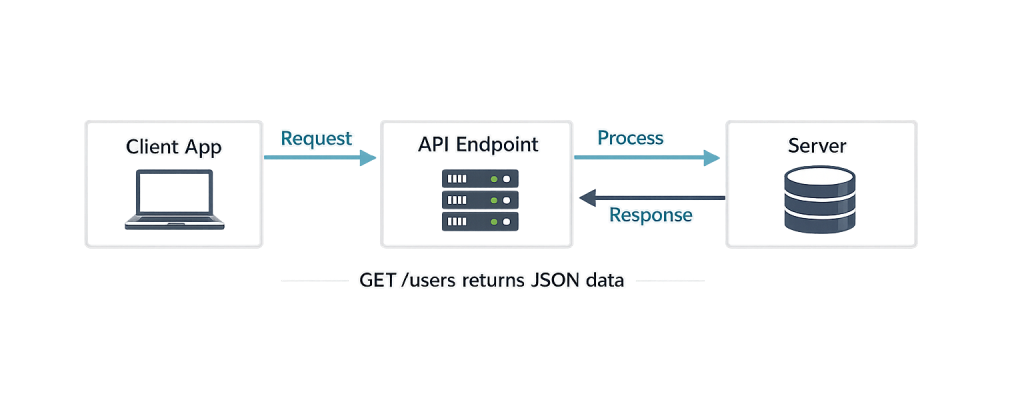
[Image: Diagram showing a client application sending a request to an API endpoint, the server processing it, and the response returning — illustrating the request/response cycle]
How APIs Work
APIs operate on a request-and-response model. The application that initiates the interaction (the client) sends a structured request to an API endpoint — a specific URL designed to receive that type of request. The server that owns the API processes the request and sends back a response, typically in JSON format (a lightweight, human-readable data structure).
The four most common HTTP methods used in API requests are:
- GET — Retrieve data (e.g., fetch a list of posts from WordPress)
- POST — Submit new data (e.g., create a new order in WooCommerce)
- PUT / PATCH — Update existing data (e.g., change a user’s email address)
- DELETE — Remove data (e.g., delete a media attachment)
Most modern web APIs follow the REST (Representational State Transfer) architectural style, which defines how requests should be structured. REST APIs are stateless — each request is self-contained and independent. WordPress includes a built-in WordPress REST API that exposes your site’s content through exactly this structure.
APIs are also secured. Most require authentication — either an API key, OAuth token, or application password — to verify the requesting application has permission to access the data.
Purpose & Benefits
1. Enabling Third-Party Integrations
APIs allow your website to connect with external tools and services without custom-built bridges. Integrating your WordPress site with a CRM like HubSpot, an email marketing platform like Mailchimp, or a payment processor like Stripe all rely on APIs. This kind of integration — handled through our WordPress development services — can automate workflows and keep your systems in sync.
2. Powering Headless and Decoupled Architectures
The WordPress REST API makes it possible to use WordPress as a “headless” CMS, where it manages content on the back end while a separate front-end framework (like Next.js or Vue.js) handles what visitors see. This approach gives developers more flexibility over performance and design without abandoning the WordPress editing experience.
3. Extending Site Functionality Without Building From Scratch
Instead of developing features like mapping, payment processing, weather data, or social feeds from scratch, APIs let developers pull in existing services. This reduces development time, relies on battle-tested infrastructure, and keeps your site’s codebase leaner. Most plugins and integrations your WordPress site uses rely on APIs under the hood.
Examples
1. Making a Simple GET Request to the WordPress REST API
Fetching published posts from a WordPress site using the REST API:
// Fetch the 5 most recent posts from a WordPress site
fetch('https://example.com/wp-json/wp/v2/posts?per_page=5')
  .then(response => response.json())
  .then(posts => {
    posts.forEach(post => {
      console.log(post.title.rendered);
    });
  })
  .catch(error => console.error('API error:', error));
This request hits the /wp-json/wp/v2/posts endpoint and returns a JSON array of post objects. No authentication is required for publicly visible content.
2. Sending Data to an External API with Authentication
Submitting form data to an external CRM via POST request, with an API key for authentication:
// Send contact form data to an external CRM via API
const formData = {
  firstName: 'Jane',
  lastName:  'Smith',
  email:     '[email protected]',
  source:    'website-contact-form'
};

fetch('https://api.externalcrm.com/v1/contacts', {
  method:  'POST',
  headers: {
    'Content-Type':  'application/json',
    'Authorization': 'Bearer YOUR_API_KEY'
  },
  body: JSON.stringify(formData)
})
.then(response => response.json())
.then(data => console.log('Contact created:', data.id));
This pattern is how form submissions, lead capture, and CRM integrations are built in WordPress without needing the CRM’s native plugin.
3. Registering a Custom REST API Endpoint in WordPress
Adding a custom API endpoint to a WordPress site using PHP:
// Register a custom REST API endpoint in functions.php or a plugin
add_action( 'rest_api_init', function () {
    register_rest_route( 'myplugin/v1', '/featured-products', array(
        'methods'             => 'GET',
        'callback'            => 'get_featured_products',
        'permission_callback' => '__return_true',
    ) );
} );

function get_featured_products( $request ) {
    $args = array(
        'post_type'  => 'product',
        'meta_key'   => '_featured',
        'meta_value' => 'yes',
        'numberposts' => 6,
    );
    $products = get_posts( $args );
    return rest_ensure_response( $products );
}
This creates a custom endpoint at /wp-json/myplugin/v1/featured-products that returns featured WooCommerce products as JSON — useful for feeding data to a mobile app, headless front end, or third-party service.
Common Mistakes to Avoid
- Exposing API keys in front-end code — API keys placed in JavaScript that runs in the browser are visible to anyone who views the page source. Server-side code or environment variables should handle authentication credentials. Never hardcode keys directly in a theme or plugin file committed to a public repository.
- Skipping authentication on sensitive endpoints — Custom REST API endpoints that expose private data, user information, or administrative functions must require authentication. Leaving them open can create serious security vulnerabilities.
- Not handling API errors — APIs fail for many reasons: rate limits, timeouts, authentication failures, server errors. Code that doesn’t account for failed responses can break silently or expose error messages to users. Always include error handling.
- Ignoring rate limits — External APIs limit how many requests you can make in a given timeframe. Exceeding those limits results in blocked requests. Cache API responses where possible instead of making repeated calls for the same data.
Best Practices
1. Use the WordPress REST API for Official Integrations
WordPress has a well-documented REST API built in. When building integrations that interact with WordPress content, use the REST API rather than direct database queries or custom AJAX endpoints. It’s more secure, more predictable, and more maintainable — especially when collaborating with other developers.
2. Cache API Responses to Improve Performance
External API calls add latency to page loads. For data that doesn’t change frequently — like store hours, product catalogs, or social media bios — cache the response using WordPress’s Transients API or an object cache. This dramatically reduces load times and avoids hitting rate limits.
// Cache an external API response for 1 hour using transients
$cached = get_transient( 'external_api_data' );
if ( false === $cached ) {
    $response = wp_remote_get( 'https://api.example.com/data' );
    $cached   = json_decode( wp_remote_retrieve_body( $response ), true );
    set_transient( 'external_api_data', $cached, HOUR_IN_SECONDS );
}
3. Version Your Custom Endpoints
When building custom REST API endpoints, include a version number in the URL structure (e.g., /wp-json/myplugin/v1/endpoint). This allows you to introduce breaking changes in a v2 without disrupting applications still using v1. It’s a small convention that prevents significant integration problems as your site evolves.
Frequently Asked Questions
What’s the difference between an API and a plugin?
A plugin is software installed in WordPress that adds features or functionality. An API is a communication interface — a set of rules for how two systems exchange data. Many plugins use APIs to connect WordPress to external services. The WordPress REST API is a specific API built into WordPress itself.
Do I need to understand APIs to manage my WordPress site?
Not deeply, but a basic understanding helps. Most API-powered functionality in WordPress is handled through plugins and settings — you don’t write code. Knowing what an API is helps you understand why certain integrations require credentials, why some features might break when a third-party service changes, and what’s possible when customizing your site.
What is the WordPress REST API specifically?
The WordPress REST API is a built-in feature of WordPress that exposes your site’s content — posts, pages, users, media, and more — through a set of standard URL endpoints. It’s what powers the block editor and enables headless WordPress builds where a separate front-end framework renders the site.
Are APIs secure?
They can be, when implemented correctly. Well-designed APIs use HTTPS encryption, require authentication, enforce rate limits, and validate all incoming data. Poorly implemented APIs can expose sensitive data. When evaluating third-party integrations for your WordPress site, it’s worth understanding what data is being exchanged and how it’s protected.
How does the WordPress REST API affect site performance?
The REST API itself has minimal performance impact on standard WordPress sites — it’s only active when a request is made to a /wp-json/ endpoint. However, if your site makes frequent external API calls on page load, those can slow things down. Caching responses is the standard solution.
Related Glossary Terms
How CyberOptik Can Help
As a WordPress-focused agency, we work with APIs on nearly every project we build — from custom REST API endpoints to third-party CRM and payment integrations. Whether you need a headless WordPress build, a custom integration between your site and an external platform, or help troubleshooting an existing API connection, our developers can help. Get in touch to discuss your project or explore our WordPress development services.