
Just looking for our Best Computer Repair Website examples list?
Key Takeaways:
- Establish trust immediately using clean design, visible credentials, and conversion-focused layouts
High-performing computer repair sites balance visuals with clear user pathways and trust signals—including client logos, technician bios, and visible security cues—to build credibility from the first interaction. - Embed DIY content and tutorials to increase dwell time and authority
Providing helpful repair guides or troubleshooting blogs creates value, improves search visibility, and positions your site as a trusted resource—an advantage most competitors miss. - Implement a responsive, mobile-first design with strong performance optimization
To support the majority of users on mobile, use fluid grids, flexible images, lazy loading, caching, and fast hosting strategies for seamless UX and SEO ranking benefits. - Prioritize accessibility and usability with WCAG-compliant elements
Inclusive design—like keyboard navigation, semantic markup, alt text, and high-contrast visuals—expands audience reach and enhances SEO relevance. - Offer transparency through up-front pricing, clear service descriptions, and structured navigation
Communicate what you charge, how the service works, and how clients can book—avoiding hidden details increases trust and reduces bounce rate. - Optimize for local SEO with structured data, location-based keywords, and FAQ schema
Use LocalBusiness schema markup, include “computer repair + city/metropolitan region” phrases, and build rich FAQ Q&A to win featured snippets and local visibility. - Differentiate with community, sustainability, and e-waste messaging
Highlighting a repair-first approach, recycling values, or local engagement as brand differentiators are absent in most repair websites.
Why Every Computer Repair Business Needs a Strategic Website Design
First impressions matter. For any computer repair service, your website is often the first interaction potential customers will have with your brand. In this competitive marketplace, a generic template just doesn’t cut it. Visitors are looking for signs of trust, professionalism, and reliability within seconds of landing on your homepage.
Whether you run a small shop or a multi-location repair company, your website is more than a digital brochure—it’s your primary sales tool. A well-executed design tailored to the repair industry builds credibility and drives measurable business results. A poorly designed site can lose a visitor in under five seconds. A strategically designed, user-friendly site can convert that same visitor into a loyal customer.
This guide is crafted specifically for the computer repair business owner who wants to rise above outdated, underperforming websites and establish a competitive digital presence. We’ll cover critical web design principles, real-world examples, and conversion strategies that deliver value and results. From responsive design to trust-building layouts, you’ll discover how to turn your website into a high-performing lead-generation engine.
If your repair service isn’t gaining traction online or your mobile device experience is clunky, now is the time to rethink your web presence. Let’s dive into the essentials of computer repair website design that drives real ROI.
Planning a Website with Purpose: The First Step to a High-Performing Site
Before you dive into design, every successful website begins with strategy. The planning phase is where you define your goals, understand your audience, and align the site’s structure to drive real business outcomes. This isn’t about picking colors or fonts—it’s about setting a direction that converts visits into booked repairs.
Start by identifying the primary objective of your site. Do you want more phone calls? More online appointment bookings? Better visibility on Google for your city? A clear goal sets the foundation for everything that follows. From there, develop user personas. Who visits your site—tech-savvy professionals, worried parents, small business owners? Each group has different needs, and your layout, messaging, and calls to action must reflect that.
Navigation should be simple and intuitive. Your services, pricing, and contact options should be accessible in just one or two clicks. On mobile, prioritize click-to-call buttons, location maps, and service overviews. On desktop, consider adding educational resources or customer reviews to reinforce trust.
Finally, use this phase to define your content structure. Outline what each page should communicate, and how it connects to your broader sales strategy. If you’re unsure where to begin, reviewing the core principles of web design is a smart way to ground your planning process in proven best practices.
Effective planning sets the stage for a website that looks great and works hard behind the scenes to generate leads and establish trust.
Design Principles That Make or Break a Website
With a clear strategy in place, it’s time to turn your attention to design. In this industry, great design isn’t about looking flashy—it’s about earning trust and guiding users toward action. Several key principles should drive your design decisions to ensure the site functions as effectively as it looks.
Start with visual hierarchy. Use consistent headings, clean layouts, and strategic whitespace to guide visitors’ eyes. Prioritize what matters most—your services, trust signals like certifications or reviews, and calls to action. Don’t let clutter compete for attention. Clean design builds confidence.
Simplicity is critical. Avoid overwhelming users with too many options. Each page should have one clear objective—whether that’s requesting a quote, calling your shop, or booking a repair. Use buttons that stand out and place them in highly visible locations, especially on mobile screens.
Consistency across your brand elements reinforces professionalism. Fonts, colors, and icons should all reflect your brand identity. Use high-quality images that reflect your actual business rather than generic stock photos. Authentic visuals build credibility with visitors who are deciding whether to trust you with their devices.
User-centered design is a must. Everything from navigation menus to contact forms should be intuitive and easy to use. Think from the customer’s perspective. Can they find what they need in a few seconds? If not, revise until it’s effortless.
Responsive design cannot be optional. With a large portion of users accessing your site via mobile devices, your site needs to load fast and function flawlessly on any screen size. If the layout breaks or navigation becomes difficult, you risk losing leads instantly.
For a full walkthrough of how design choices should evolve from concept to launch, refer to this step-by-step guide to the web design process. It provides a behind-the-scenes look at turning design principles into a finished, high-performing site.
Good design is more than aesthetics. It’s a communication tool that drives business results. That means converting clicks into customers with clarity, trust, and simplicity at every turn.
Structuring Content and Navigation for Maximum User Engagement
Content and navigation are the engines that drive your website’s usability and engagement. It’s not just about what you say—it’s about how clearly and efficiently you guide visitors to the information they need. The structure of your content and your menu should serve one core purpose: helping users take action without frustration.
Start by organizing content into logical categories. Core service pages like “Virus Removal,” “Hardware Repair,” and “Data Recovery” should be clearly labeled in the top-level navigation. Each service page should include a summary of the issue, the repair process, and what the customer can expect. Use headings, bullet points, and visuals to keep content scannable.
Don’t bury important information. Place high-demand pages such as “Contact Us,” “Schedule a Repair,” and “FAQs” in easy-to-access locations on both mobile and desktop. Use sticky headers or persistent navigation bars to ensure these CTAs remain visible as users scroll.
Use homepage content as a directional hub. Above the fold, clearly define who you are, what you do, and how users can take the next step. Beneath that, feature service highlights, testimonials, and trust signals like certifications or Better Business Bureau affiliations.
Visual elements matter too. Icons and imagery should support content rather than distract. For example, a wrench icon next to “Hardware Repair” or a shield icon next to “Virus Protection” gives users instant visual understanding.
For SEO and user trust, include a blog or resource section that provides DIY tips, device care advice, or answers to common tech questions. This establishes your business as helpful and knowledgeable while improving keyword reach. Internal links between blog posts and service pages also boost engagement and conversion.
To ensure your layout supports a seamless experience, review these best practices in web design for enhancing user experience. They’re especially relevant for keeping visitors engaged and encouraging them to move from browsing to booking.
A strong content and navigation strategy keeps users informed, confident, and ready to act—key outcomes for any high-performing site.
How Visual Elements Strengthen User Experience and Brand Credibility
Visual elements shape perception, enhance usability, and reinforce your brand identity. For a computer repair website, the right use of images, icons, video, and visual hierarchy can make the difference between a forgettable site and one that builds instant trust.
Start with photography. Avoid generic stock images of computer parts and instead use real photos of your team, your storefront, or your repair setup. Authentic visuals add credibility and create a human connection. If you offer on-site service, include photos of your team in the field. For in-shop repair companies, images of your workspace signal professionalism and care.
Icons help users navigate more efficiently. Pair each service with a unique icon that visually represents the task—like a hard drive icon for data recovery or a shield for virus protection. These visuals act as quick cues that reduce cognitive load and improve comprehension.
Video is especially powerful when used thoughtfully. A short introductory video on your homepage can show your team in action, explain how your service works, or walk through the repair process. It gives visitors a reason to stay longer and builds rapport with those who prefer to absorb information visually.
Color is another critical tool. Your color palette should reflect your brand identity and support accessibility. Use contrasting colors for buttons and calls to action to draw attention without overwhelming the viewer. Avoid dark text on dark backgrounds or overly saturated colors that strain the eyes.
Typography should be clean and easy to read. Choose web-safe fonts and maintain a clear hierarchy with consistent use of headings and subheadings. Break up long blocks of text with bullet points and visual breaks to support skim-reading behavior.
Finally, consistency is key. All visual elements—from photography style to icon design—should follow a unified theme. This cohesiveness reinforces brand recognition and ensures a professional presentation across every page of your site.
In this industry space, where trust and clarity matter, great visual design is more than a nice-to-have. It’s a strategic advantage that enhances user experience and positions your business as credible, capable, and customer-focused.
Ongoing WordPress Maintenance for Reliable Performance
A computer repair website is only as effective as its reliability. WordPress may be a powerful and flexible platform, but it also requires consistent upkeep to maintain performance, security, and functionality. For businesses offering repair services, downtime or broken features on your own site sends the wrong message to potential clients.
The first step in ongoing maintenance is regular updates. WordPress core, themes, and plugins receive frequent patches to improve performance and close security gaps. Failing to install these updates exposes your site to vulnerabilities that could lead to outages or data breaches. Updates should be tested in a staging environment when possible to avoid unexpected errors on the live site.
Website backups are critical. Regularly scheduled full-site backups ensure that you can recover quickly in the event of a crash, hack, or accidental content deletion. These backups should be stored securely off-site and verified for accuracy.
Security monitoring should be active and ongoing. Use tools to track unauthorized login attempts, flag malware, and alert you to suspicious changes. A secure site reassures visitors that their information is safe when submitting forms or booking services.
Performance optimization also plays a major role in maintenance. Monitor your site’s speed and use caching, compression, and database cleanups to reduce load times. This is especially important for mobile visitors who expect fast-loading pages.
Broken links, outdated content, or plugin conflicts can harm both user experience and search rankings. Monthly audits help you spot these issues before they create real problems. Check contact forms, booking tools, and any interactive elements to ensure they function correctly.
Even design and content need occasional refreshing. Technology changes fast, and the messaging that worked a year ago may not be effective today. Periodically review your calls to action, service descriptions, and testimonials to keep everything aligned with your current business goals.
Reliable WordPress maintenance ensures that your site continues to reflect the professionalism and technical capability of your business. It’s not just a backend task—it’s a front-facing signal that your business is current, secure, and trustworthy.
Best Computer Repair Website Design Examples

1. QuickTech Solutions – India
- Clear service categories for business and residential clients
- Prominent call-to-action button on every page
- Strong testimonial section supporting trust
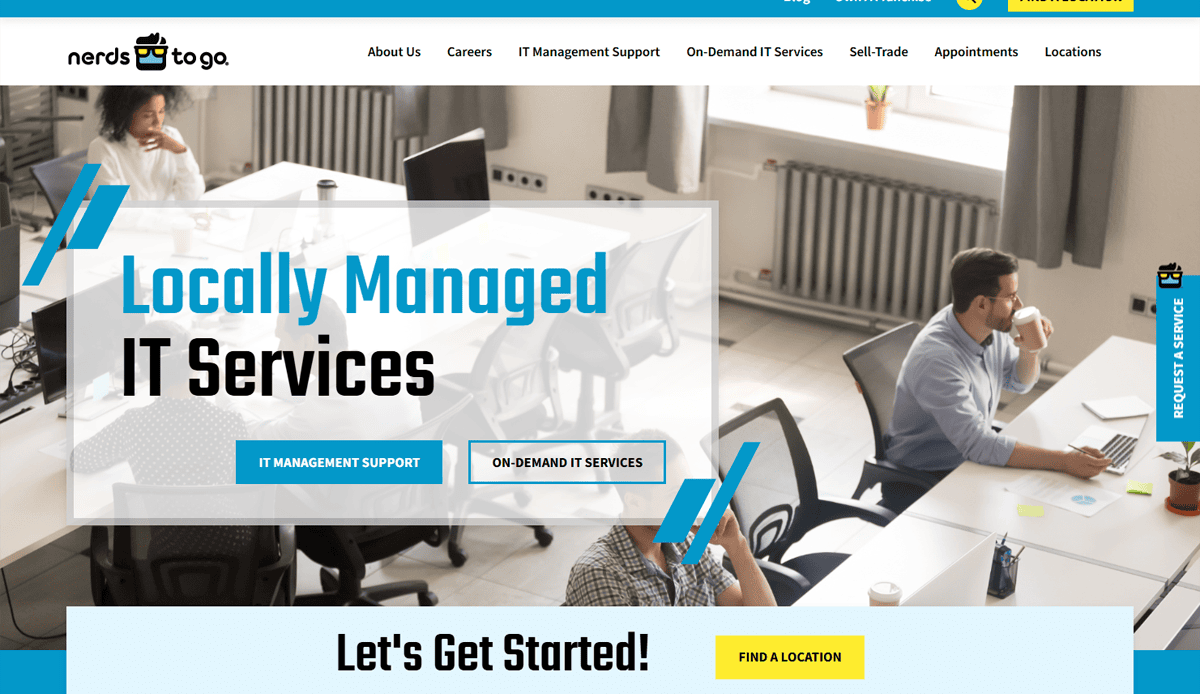
2. NerdsToGo – Stamford, CT
- Bold colors with strong brand identity
- Localized landing pages to support multiple franchises
- The on-site booking form is easily accessible
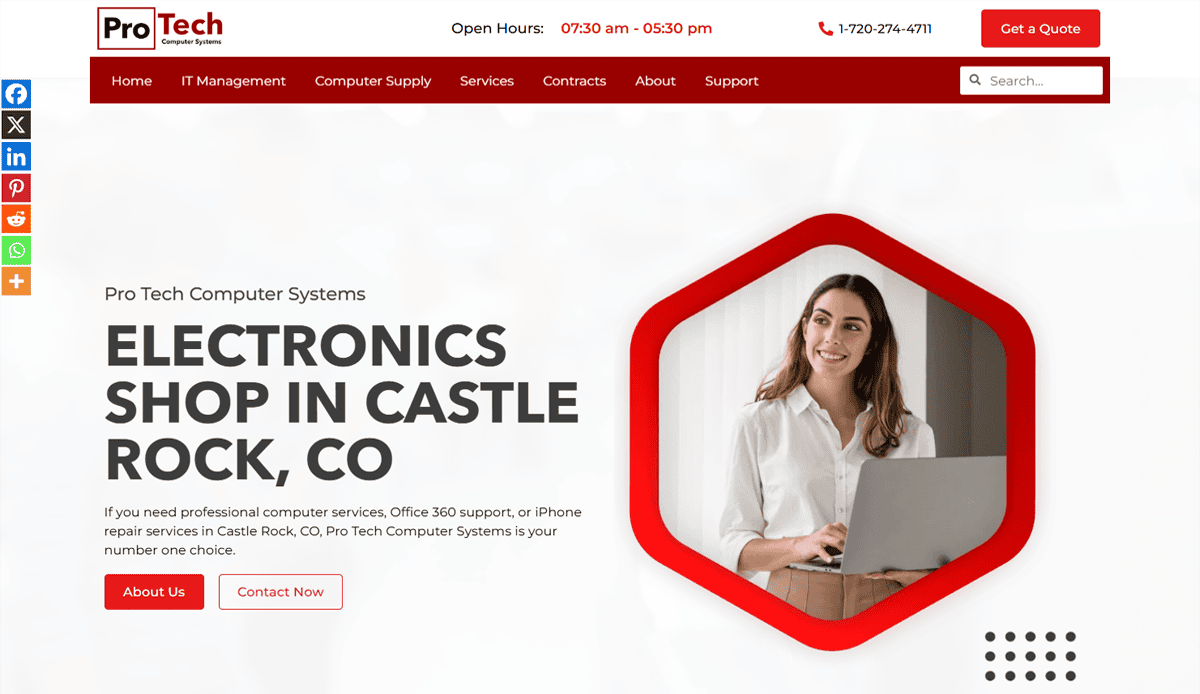
3. ProTech Computers – Denver, CO
- Strong focus on small business and residential repair services
- Clean, responsive layout with a prominent “Request Service” CTA
- Blog updated regularly with computer maintenance and tech support tips
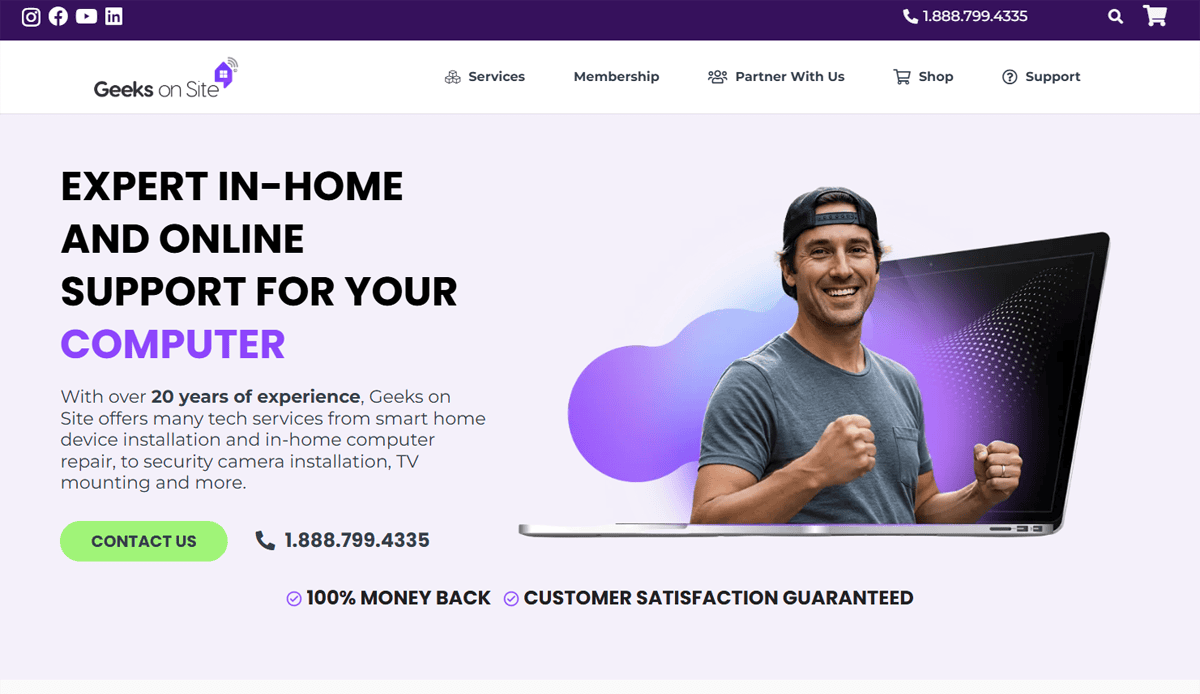
4. Geeks on Site – Miami, FL
- Clean layout with segmented service overviews
- Real-time chat feature for customer support
- Visual icons help guide visitors to relevant solutions
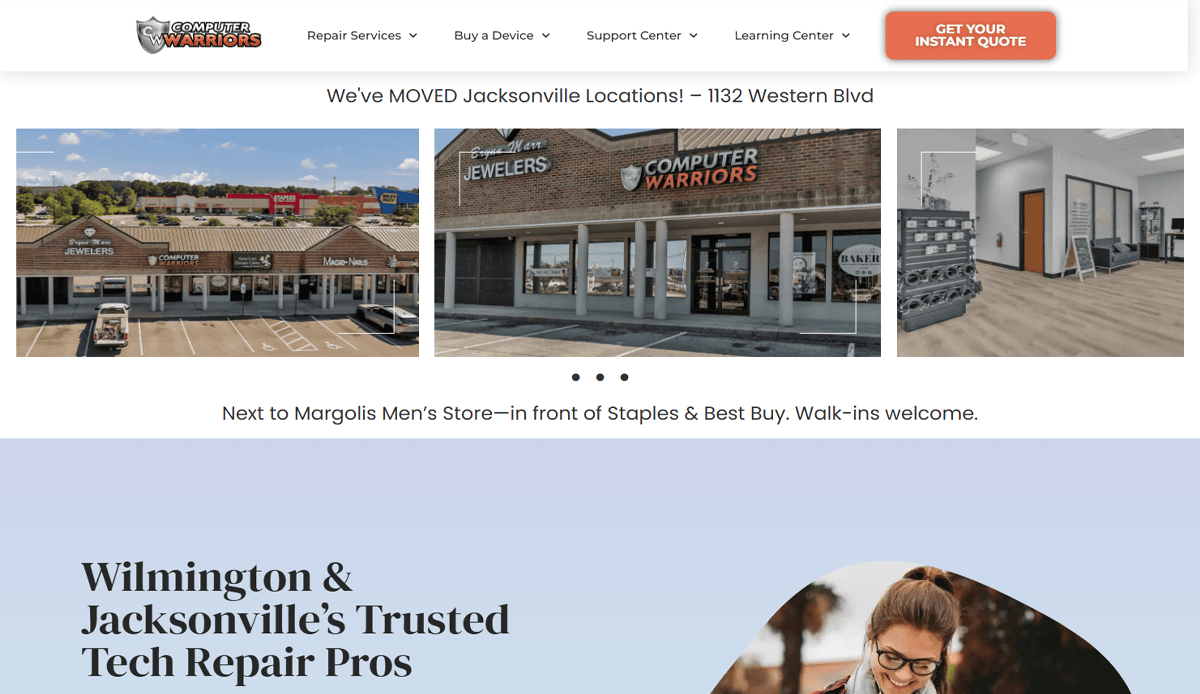
5. Computer Warriors – Wilmington, NC
- Strong focus on cybersecurity and device repair
- High-quality visuals with real photos
- Services explained clearly with consistent CTA use

6. TekRefurbs – Austin, TX
- E-commerce integration for refurbished computers
- Grid-style product showcase with prices
- Seamless checkout process with trust badges

7. ClickAway – San Jose, CA
- Multiple store locations are easily accessible via a dropdown
- Highlighted “Same Day Repair” service
- Strong SEO structure with city-level service pages
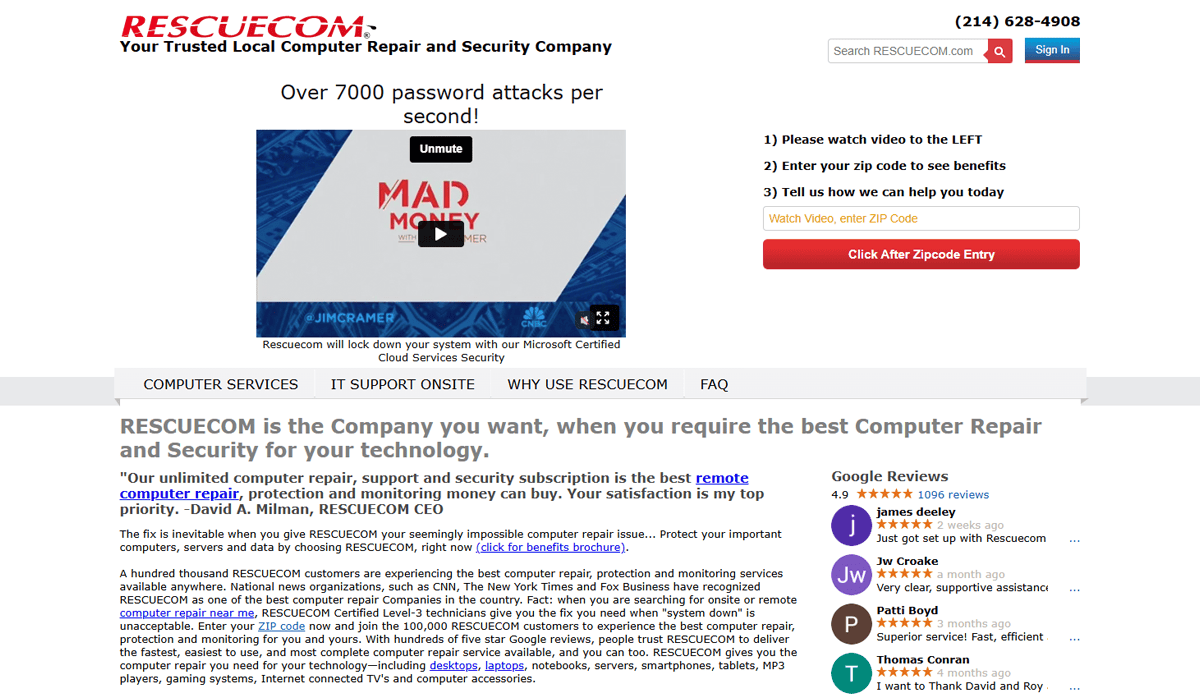
8. RESCUECOM – Syracuse, NY
- Bold hero statement for immediate clarity
- Toll-free number prominently displayed
- Detailed breakdown of services offered by category
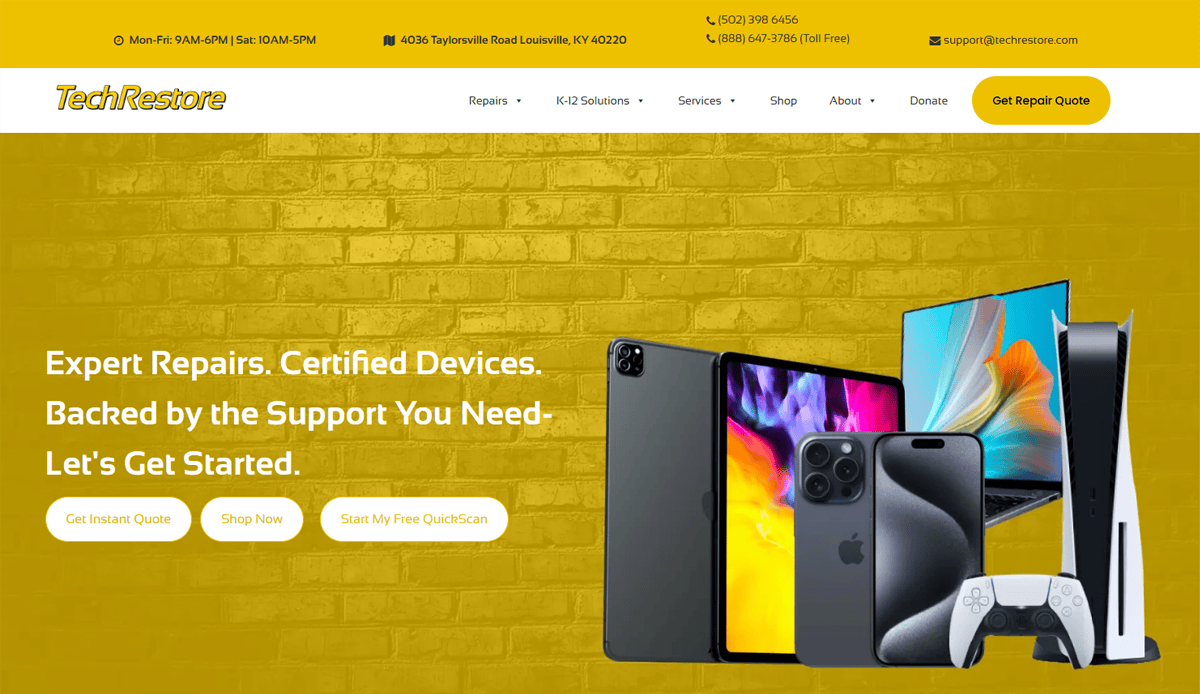
9. TechRestore – Louisville, KY
- Apple product specialists emphasized
- Clean, open layout that’s easy to navigate
- Informative blog that builds authority and SEO

10. Experimax – Boca Raton, FL
- Well-structured product and service navigation
- Consistent branding across national franchise pages
- Simple inquiry form on homepage
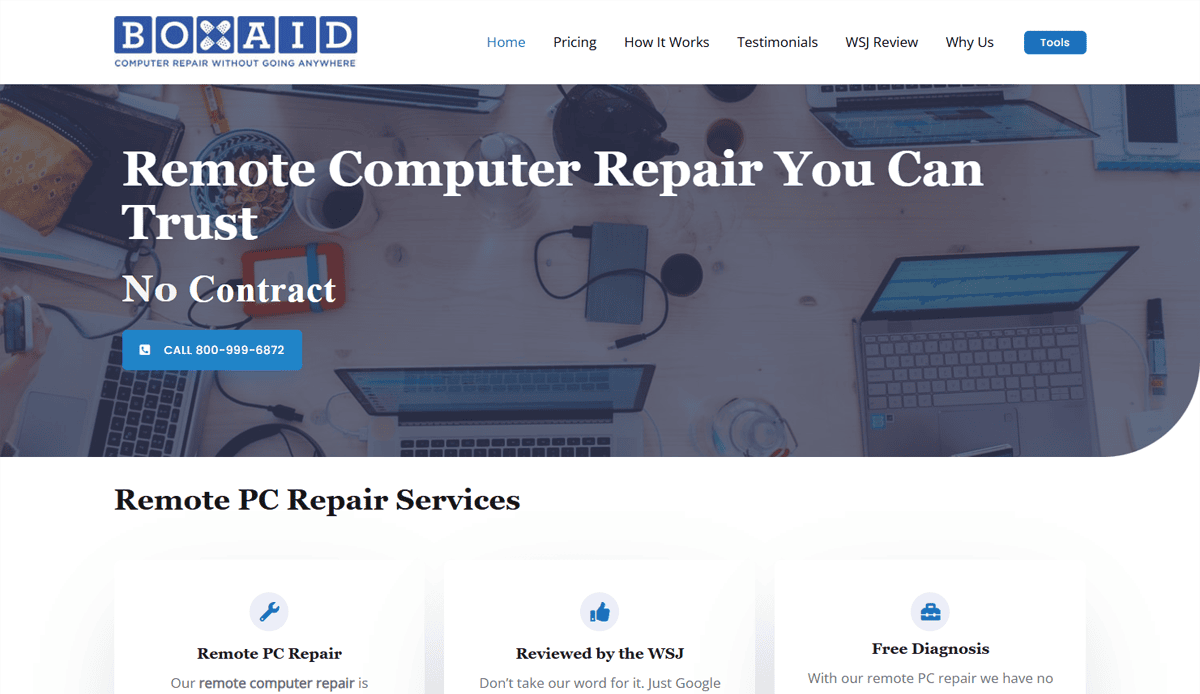
11. Boxaid – Jersey City, NJ
- Remote computer repair is highlighted front and center
- No-obligation consultation messaging
- Strong trust indicators from third-party sites
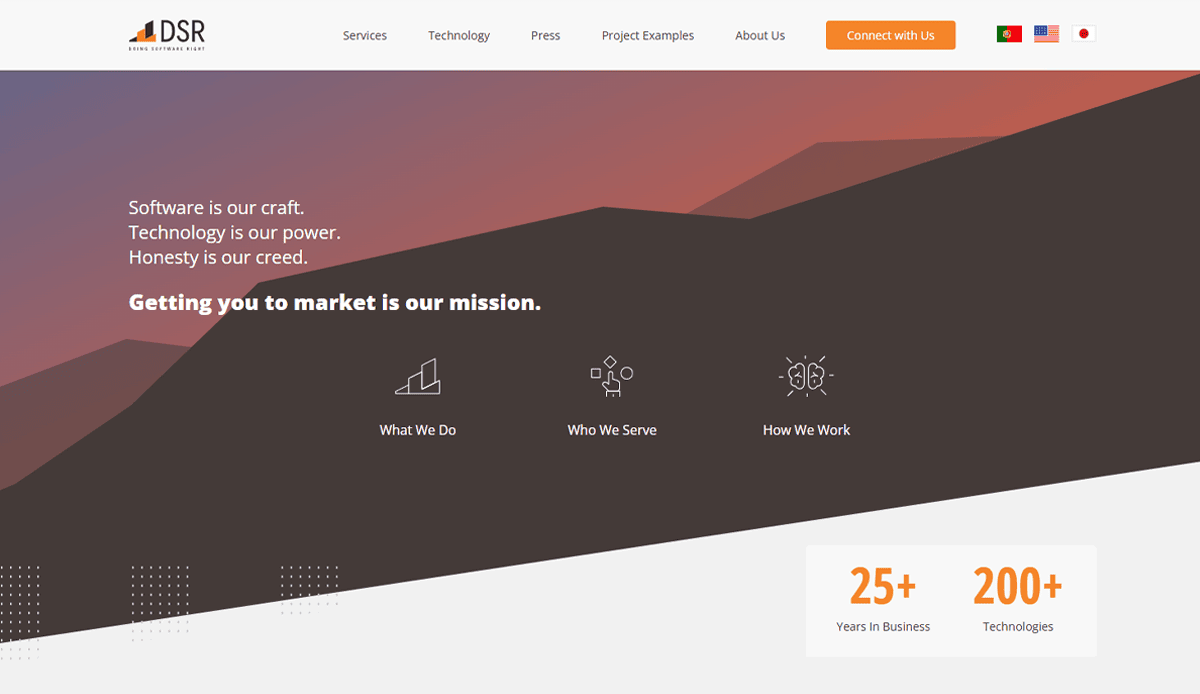
12. DSR Computer Services – Golden, CO
- Dark modern theme with bright CTA contrast
- Local-focused trust messaging
- Comprehensive services for businesses and consumers
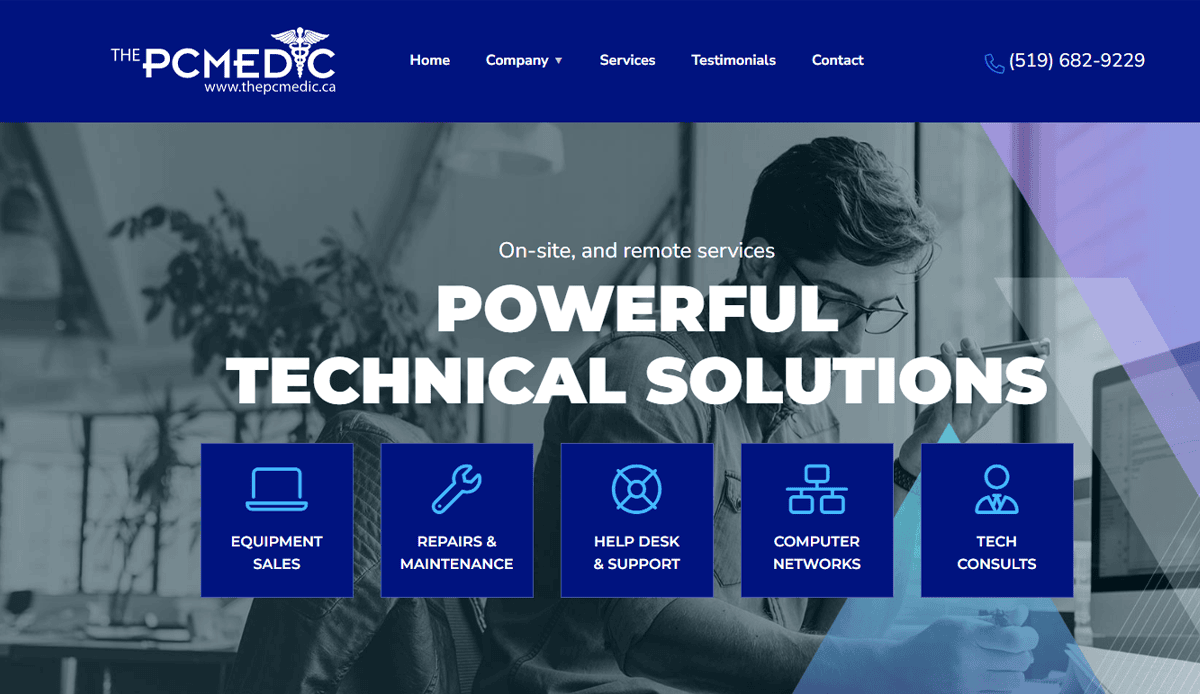
13. The PC Medics – Ontario, Canada
- Visual icons organize service offerings
- Clear pricing table for transparency
- Appointment booking is embedded within the homepage

14. Computer Prodigies – Chicago, IL
- Vibrant color used to reflect a tech-savvy tone
- Quick diagnostic scheduling above the fold
- Good use of microcopy to ease user concerns

15. HelloTech – Los Angeles, CA
- On-demand tech support services simplified
- Location-based service options
- Slick use of icons and concise descriptions

16. New England IT Partners – Boston, MA
- B2B-focused layout with industry-specific language
- Detailed service sections for enterprise support
- Visible certifications and partnerships
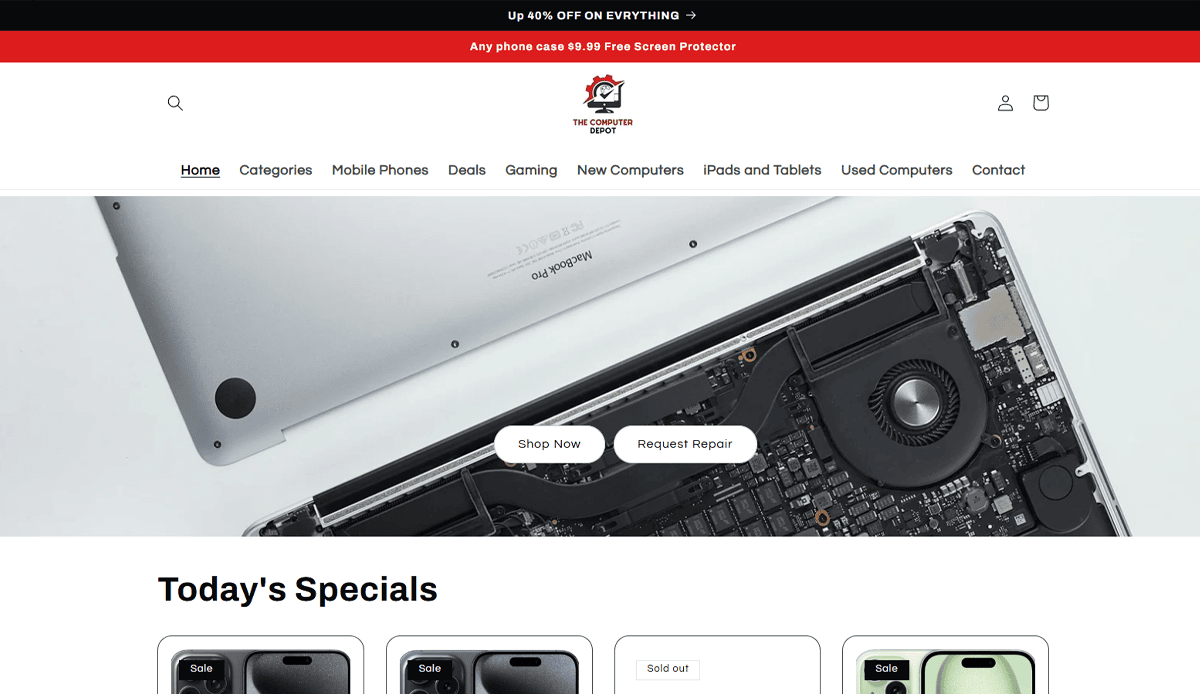
17. The Computer Depot – Bakersfield, CA
- Trusted local brand with 20+ years of service
- Localized service pages that rank well
- Emphasis on walk-in repair convenience

18. Visionary IT – Scottsdale, AZ
- Blend of IT support and pc repair services
- Integrated client ticketing portal
- Strong focus on small business support

19. Nerd Busters – Brooklyn, NY
- Personality-driven brand voice and images
- Effective headline/copy combos
- Unique scrolling layout with tech-focused design

20. Blue Collar Tech Group – Clinton, MO
- Down-to-earth messaging and tone
- Clear, honest pricing on service pages
- Fast-loading design with simplified navigation
Ready to Build a Website That Works as Hard as You Do?
A successful computer repair shop needs more than just the ability to fix devices—it needs an online presence that builds trust, captures leads, and converts visitors into customers. Whether you’re managing a phone repair startup or a full-service electronics repair company, investing in a professional computer repair website is one of the smartest moves you can make.
Your site should be more than a page template—it should be a custom website tailored for computer repair. With smart design, seamless navigation, and ongoing maintenance, your web presence becomes a lead-generation engine, not just a digital placeholder.
If you’re ready to work with a web designer who understands the unique needs of repair shops and offers custom web design services that reflect your professionalism, contact our experts today to get started.
Frequently Asked Questions About Computer Repair Website Design
What pages should a professional computer repair website include?
A complete site should have a homepage, services pages (for device repair, pc repair, mobile phone repair, and smartphone repair), a contact page, FAQs, and a blog. A professional website also benefits from custom design elements like service highlights and local SEO landing pages tailored for computer repair.
Should I use a website template or invest in a custom design?
While a website template might seem faster and cheaper, most places need a website tailored specifically for computer repair. A custom website built by a web designer ensures the design aligns with your brand, supports SEO, and includes services for computer repair in a structured layout.
Can I build my own repair site using an AI website builder?
An AI website builder for computer services can work for very basic needs, but it often lacks the flexibility, SEO capability, and unique design features a computer repair company requires. To streamline the website creation process and maintain a professional appearance, many opt for a WordPress website with custom features.
How does web design impact lead generation?
It directly influences trust, navigation ease, and page loading speed. These factors are critical to getting users to convert. Clear calls to action, a modern design, and trust signals can increase conversion rates significantly for computer maintenance and tech support businesses.
What design tools or features are helpful for showcasing services offered?
For computer repair, site design, use a service site builder or WordPress plugins to list services offered. Icons, service summaries, and testimonials support visitor decision-making. Visual hierarchy and mobile responsiveness also ensure a creative website that is usable on all devices.
What sets the best computer repair websites apart?
The best computer repair websites combine attractive website layouts, user-friendly navigation, fast performance, and local SEO strategies. They often include testimonials, custom design, and visuals that communicate professionalism and trust.
How often should I update my computer repair website?
Website development should be ongoing. Regular content updates, plugin checks, and WordPress maintenance keep your site functional and secure. A stale or broken website negatively affects both user trust and search visibility.
Is it necessary to show photos of my workspace or shop?
Yes. Including real images of your location, team, or workstations on your professional computer repair website enhances credibility. Stock images won’t create the same connection with your audience or differentiate your brand in the computer repair industry.
What if I offer both computer and mobile repair?
Your site should be structured to highlight all services clearly. Separate pages for mobile repair, smartphone repair, and computer components help improve relevance for search engines while supporting the user journey. It also reinforces the breadth of services for computer repair.
Can AI tools help manage or improve my site?
AI tools can support areas like customer support (via chatbots), performance monitoring, or content suggestions. However, for full control, brand alignment, and SEO, nothing replaces a tailored website built and maintained by an experienced team familiar with site design and development for computer repair.


